
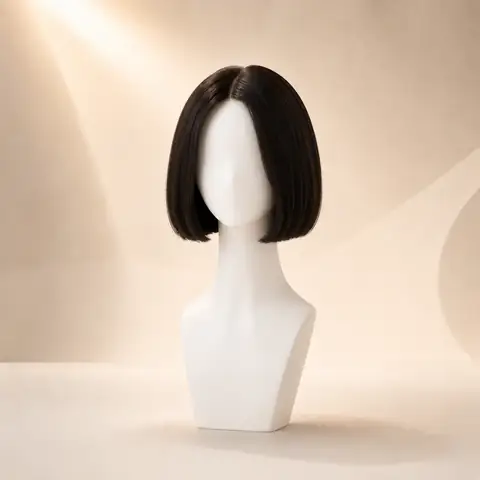
Blunt bob
A compact, jaw-level outline that makes the endpoint easy to judge against the chin and neck.
bob hairstyle guide
See how endpoint, texture, and volume change a bob, then compare short directions on your own photo.
No app required · Style preview only · Not a wig store
Bob hairstyles share a short, visible perimeter, but they do not create one fixed look. A blunt bob emphasizes the line of the ends, a curly bob adds rounded volume, and an asymmetrical bob changes balance around the face. Use one photo to compare those variables before focusing on color.
Entity definition
A bob is a short-to-medium hairstyle with a visible perimeter that usually ends between the jaw and just above the shoulders. Its effect changes with the endpoint: a blunt jaw-length bob creates a firmer outline, while curls, asymmetry, or a longer lob soften and redistribute that shape.
| Attribute | Typical direction | What it changes visually |
|---|---|---|
| Typical endpoint | Jaw to above shoulder | The line of the ends is the feature that most clearly separates a bob from longer cuts. |
| Silhouette | Defined perimeter | A blunt edge looks compact; layers, curls, or asymmetry make the outline less uniform. |
| Texture range | Straight, wavy, or curly | Texture changes how sharp the perimeter looks and where visible volume sits. |
| Volume | Low to high | A sleek bob stays close to the head, while a curly bob can add width around the cheeks and jaw. |
| Movement | Cut dependent | One-length bobs move as a solid shape; layered or wavy versions break the outline into softer sections. |
| Face framing | Strong endpoint effect | Where the bob stops can visually emphasize the jaw, chin, neck, or shoulder line. |
| Maintenance perception | Medium to high | A precise perimeter changes visibly as it grows, while textured bobs can look less exact between trims. |
Visual examples
Keep the same portrait and start with one stable color. The labels below describe the visible direction, not a guaranteed salon or product result.
A compact, jaw-level outline that makes the endpoint easy to judge against the chin and neck.
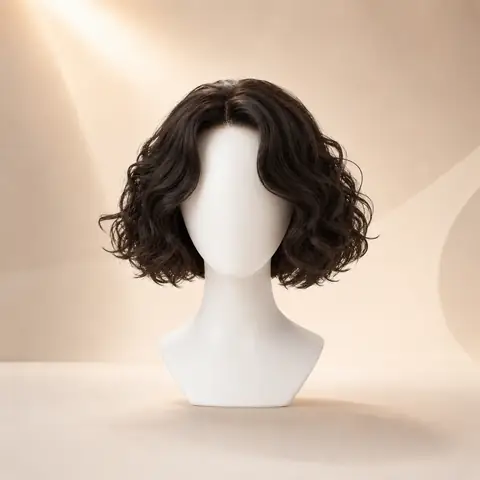
A short curl pattern that shifts attention from a straight perimeter to volume and rounded movement.
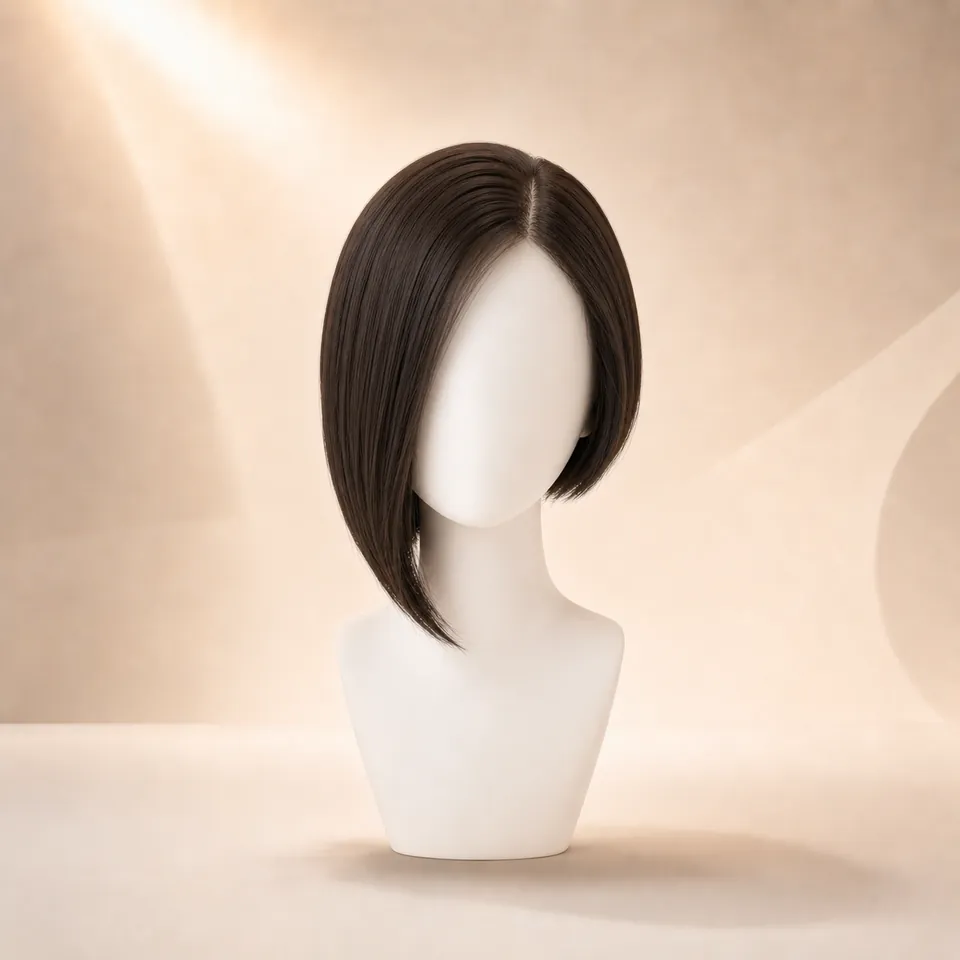
An uneven front or side length that changes the balance of the bob without removing its short outline.
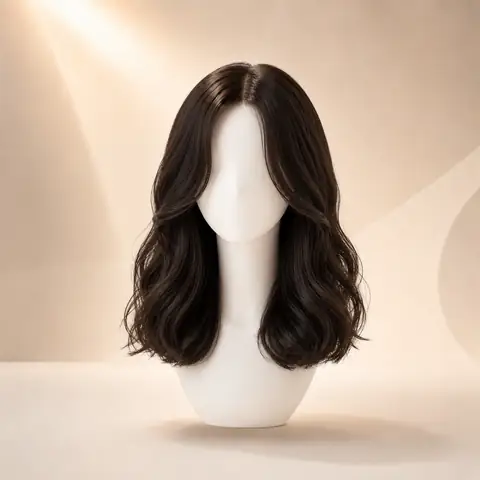
A shoulder-level comparison that shows how a few extra inches soften the endpoint and preserve more length.
A blunt bob keeps the perimeter visually firm, so the endpoint carries most of the look. Compare a jaw-length version with a shoulder-length blunt bob on the same photo; the shorter line emphasizes the jaw and neck, while the longer line leaves more movement around the shoulders.
A textured bob breaks up the solid outline with layers, bends, or separated ends. It can reduce the visual weight of a blunt perimeter, but added texture may also create width near the cheeks, so judge the outer silhouette before color.
Curly bob haircuts combine a short endpoint with visible curl volume. A short or stacked curly bob concentrates shape around the back and sides, while a longer curly bob lets the pattern fall lower. AI can preview that direction, but it cannot predict shrinkage, density, or the exact stack a stylist can create.
Bangs add a second strong line to a bob. Compare blunt, curtain-inspired, or lighter fringe separately because forehead coverage can change the face frame as much as the bob length itself.
Bob styles accounted for 2,047 of 10,000 completed generation events (20.5%) in WigTryAI's 2026 AI Hairstyle Trends Report. The total combines six bob and lob silhouettes, so it describes recorded activity across a family rather than one universal bob preference.
Color options
Compare color after choosing a silhouette so contrast, warmth, and dimension stay easy to judge on the same photo.
Preview soft black or natural black hair directions.
Try this colorCompare dark brown, chocolate, chestnut, and warm brown ideas.
Try this colorTry honey blonde, golden blonde, beige blonde, or platinum tones.
Try this colorExplore a richer red-purple shade without changing your real hair.
Try this colorPreview darker roots fading into lighter ends.
Try this colorClosest comparison
The useful question is not which name sounds better. Compare where the ends land and what that line does around your jaw, neck, and shoulders.
Open the full comparison| Compare | Bob | Lob |
|---|---|---|
| Typical endpoint | Jaw or chin area | Shoulder or collarbone area |
| Visible neck | Usually more exposed | Usually more covered |
| Outer shape | Compact and clearly outlined | Longer and more vertical |
| Pull-back options | Often limited by length | More likely to reach a low tie |
| Grow-out visibility | Endpoint changes quickly | Length changes can feel more gradual |
What changes visually
Notice whether the visible line lands at the widest part of your jaw, below it, or closer to your shoulders.
Compare a straight and curly bob at a similar length so you can tell whether you prefer the cut or the added volume.
A blunt bob and a curly bob can occupy very different amounts of space around the cheeks.
Place a lob beside the bob before deciding whether the exposed neck and shorter outline feel useful.
Realistic limits
An AI preview cannot predict the exact endpoint a stylist will create after accounting for your natural texture and shrinkage.
It cannot show how a real bob will move, tuck behind the ears, or behave as it grows.
Visible density and volume are generated approximations, not a measurement of your hair.
Use the image to compare silhouette and length direction, then discuss cutting and maintenance details with a stylist.
Start with a clear front-facing selfie. Good light and a visible hairline help the preview feel more natural.
Choose hairstyle families, lengths, textures, and color directions that you want to try.
Create an AI result from your selected look, then review how the shape and color frame your face.
Use the result for personal style comparison, or share one favorite look for quick feedback.
Why use this tool
Start with a clear portrait, compare one variable at a time, and use the result as a visual reference for your next style decision.
No app required
Multiple styles
Quick preview
Style inspiration only
Privacy note
WigTryAI is built for personal visualization and style inspiration. It does not sell physical wigs, beauty products, or salon services, and it does not provide commerce matching. Your generated look is meant for exploration, comparison, and optional friend feedback.
A bob is identified mainly by its short-to-medium endpoint and visible perimeter, usually between the jaw and above the shoulders. Texture, layers, bangs, and asymmetry can change the outline without removing the basic bob structure.
Yes. Comparing both is useful because the endpoint changes from the jaw area to the shoulder or collarbone area. That difference affects visible neck, face framing, and pull-back options.
Use a front-facing portrait with even light, a visible jaw and neck, and as little head tilt as possible. Avoid hands, scarves, or heavy filters around the hairline and shoulders.
Yes. Keep the photo and color stable so you can isolate the difference between a defined perimeter and added curl volume.
No. An AI preview can help you compare endpoint and silhouette, but it cannot predict exact cutting technique, shrinkage, density, movement, or salon execution.