
Water wave hair guide
Water Wave Hair: What It Looks Like, How to Get It, and How to Style It
Water wave hair is a rippled texture that sits between flowing waves and looser curls: small, slightly irregular S-shaped ripples that run in mixed directions and catch light like water. It usually reads more defined than body wave, softer and less uniform than deep wave, and glossier and fuller than a standard wave. The same label shows up in three different places — wig and extension catalogs, natural-hair styling, and trend names like mermaid waves — and the pattern you actually get depends on which one you mean.
Water wave hairWater wave hairstyleWater wave textureWater wave wigWave styling
10 min read
Quick answer
Look for small ripples that travel in mixed directions
Water wave hair forms small, repeated S-shaped ripples that curve in slightly different directions instead of flowing as one uniform wave. It sits between wavy and curly: more defined than a broad body wave, softer and less structured than deep wave, with a glossy, full surface. Judge it by three clues — ripple size, whether the sections run in mixed directions, and how much the outline widens through the length.
- Pattern
- Small, irregular S-ripples in mixed directions
- Placement
- Between wavy and curly, under deep wave
- Surface
- Glossy and full-looking with visible movement
The name water wave describes a visible texture, not one universal specification. In wig and extension catalogs it usually names the pattern supplied by the maker; in styling content it can refer to a looser, set wave. The two uses overlap but are not identical, so read the reference in front of you rather than trusting the label.
Three details separate water wave from an ordinary wave:
- The ripple direction is less uniform. Sections curve in slightly different ways, which is why the surface looks textured rather than smoothly repeated. Some strands ripple one way, others another, like water disturbed from several points.
- The pattern reads fuller. Water wave usually has more visible body than body wave at the same length, so the silhouette widens through the middle rather than hanging as a smooth sheet.
- The surface looks glossier. The tighter, more frequent curves catch light in small highlights, which is why water wave hair is often described as shiny or lustrous in product descriptions.
How to Read a Water Wave Reference
Not every "water wave" photo shows the same texture. Wig makers, extension brands, stylists, and AI tools each interpret the label differently, and the difference matters more than the name. Use these four checks on any reference before you decide:
- Read the mid-lengths, not the roots or ends. At the roots many wave styles lie fairly flat; at the ends a bend can flip outward or thin into a straighter tip. The middle of the hair shows the true pattern.
- Look at the first full ripple near the face. Where the first ripple begins — beside the cheek, at the jaw, or below the shoulder — changes how the style frames your face more than the pattern label does.
- Check whether the sections repeat or wander. A genuine water wave texture shows ripples that are similar in size but not identical in direction. If every section looks machine-stamped the same way, you are probably looking at a different, more uniform texture.
- Compare outer width at the same length. Water wave usually sits wider than body wave and narrower than most curl patterns. The width tells you how much volume the style will bring to your silhouette.
Where You'll See "Water Wave"
The same phrase means different things depending on context. Knowing which one you are looking at prevents most confusion.
Water wave as a wig or extension texture
In wig and extension catalogs, water wave names the pattern the maker produced. The label does not tell you fiber type, density, cap or installation structure, how consistent the pattern is across the bundle, or how the texture behaves after washing. Two "water wave" wigs from different makers can look noticeably different. Use the maker's current photos and care instructions for those details — and if a product photo is tiny or heavily filtered, ask for a closer look at the mid-lengths.
Water wave on styled natural hair
Natural hair can be set into a rippled wave with damp braids, twists, rollers, or heat. The visible result depends on starting texture, density, length, technique, products, and how the hair dries. The same method on fine hair and on thick textured hair produces two different-looking results.
Watch out for nearby trend names
Mermaid waves and waterfall waves are styling trends with soft, continuous S-movement — not the irregular water-ripple texture that "water wave hair" usually refers to. If you search for one and see the other, check the pattern scale and whether the sections run in mixed directions before assuming they are the same look.
Medium, Long, and Extra-Long Water Wave
Compare length with the texture held steady
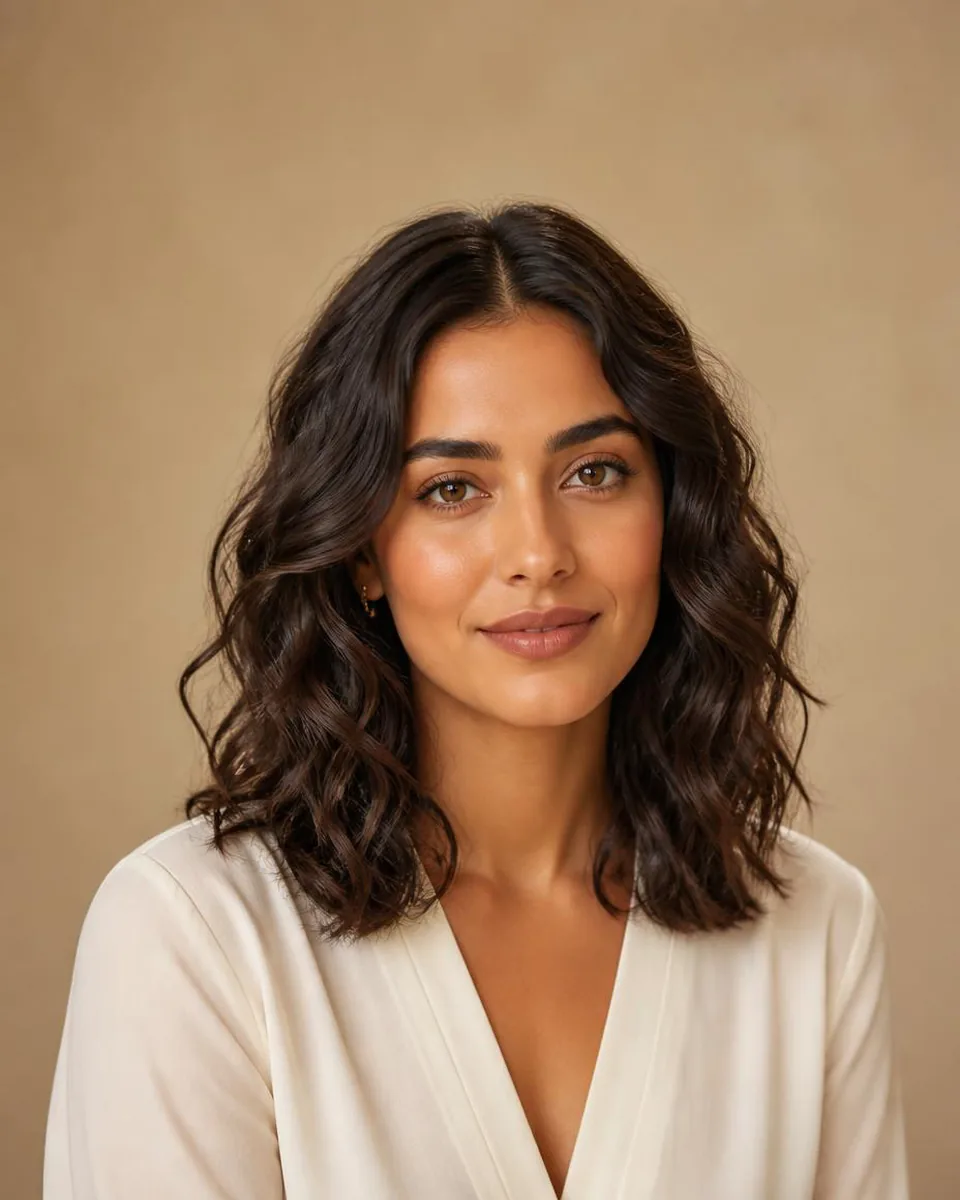
These three editorial references keep the same model, color, and framing so length is the only variable. Compare where the ripples sit, how wide the outline grows, and where the ends stop.
Medium water wave
The ends sit around the shoulders, so the rippled pattern and most of the visible width stay close to the face and neckline.
Try this look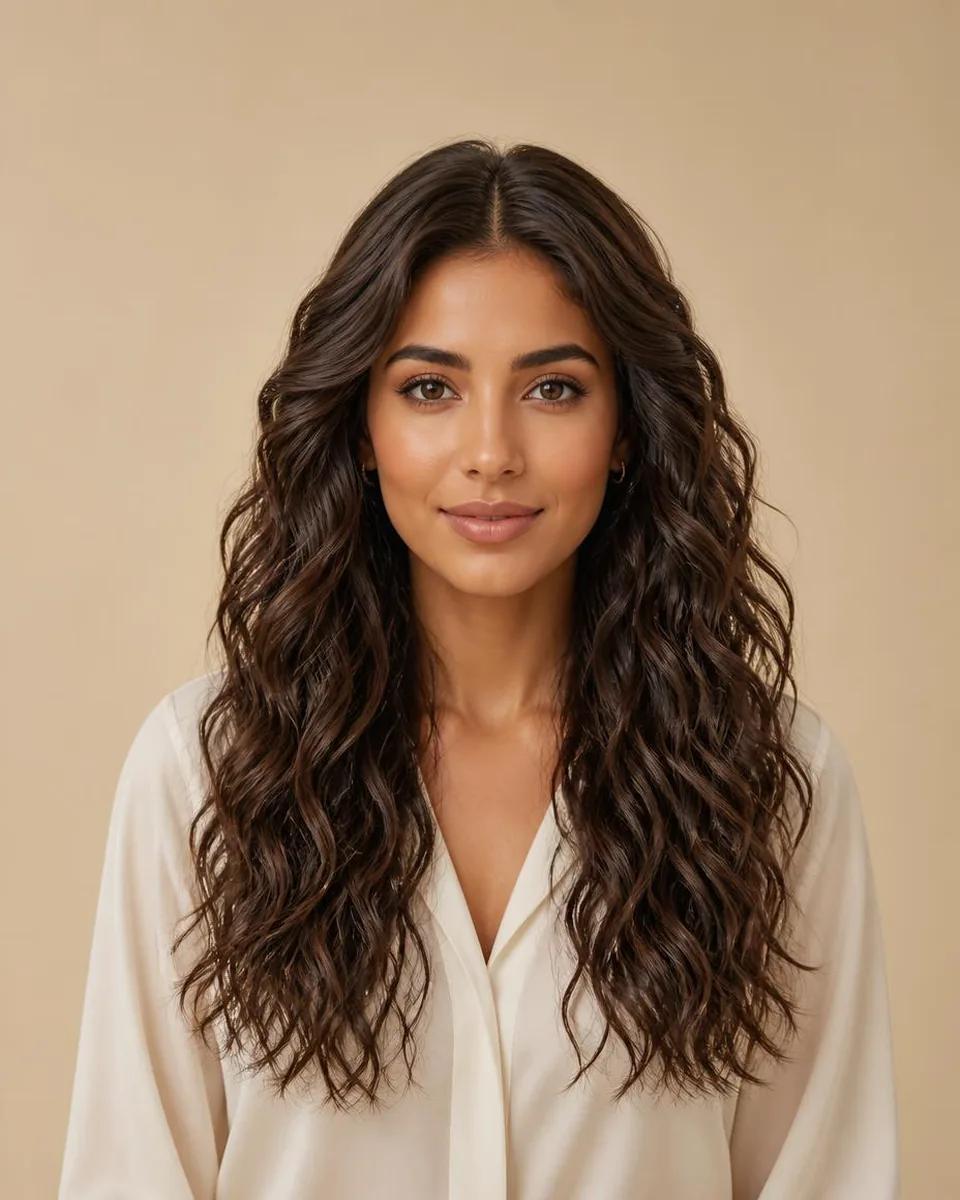
Long water wave
More length gives the irregular pattern room to repeat below the shoulders while keeping a clear endpoint.
Try this look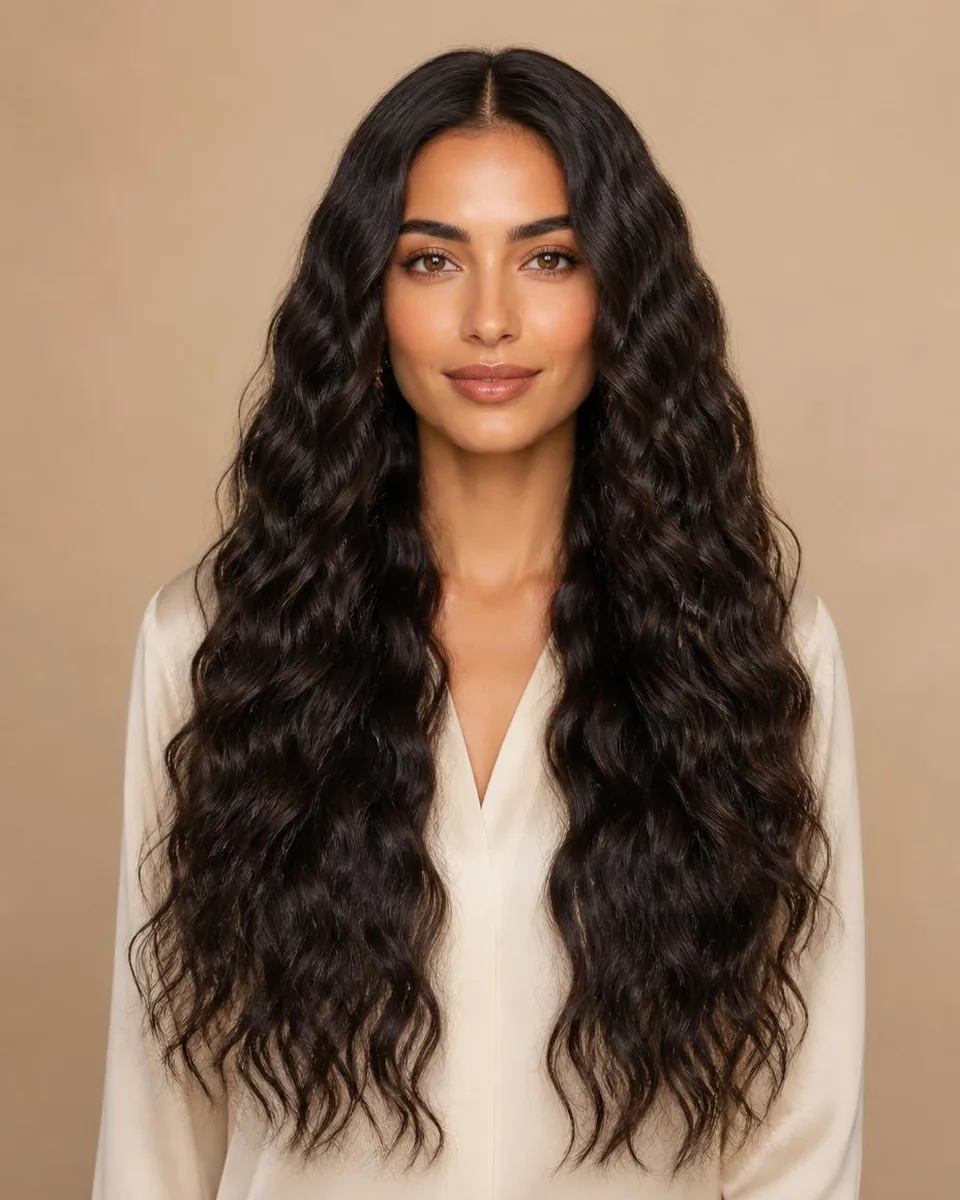
Extra-long water wave
The extended outline carries several repeats of the pattern farther down, making length and lower-body fullness more prominent.
Try this lookMedium water wave
Medium length puts the placement of every ripple front and center. If the widest point sits beside the cheeks, the style reads wider near the face; if the movement begins below the jaw, the emphasis shifts to the shoulders. "Medium" can mean anything from just above the shoulders to the collarbone in different catalogs, so check the actual endpoint rather than the word.
Long water wave
Long water wave shows the pattern several times while keeping the endpoint visible, which makes it the most useful baseline for comparing wave families: the mid-length texture, face frame, and ends are all in one frame. Look for whether the front sections open away from the face or fall forward as two heavier panels — that single detail changes how much of your face stays visible.
Extra-long water wave
Extra-long hair extends the vertical outline and repeats the pattern more times, but it can also dominate a portrait. Compare the lowest visible endpoint and the farthest side width, not just the number of ripples. A long, full water wave frame also adds perceived weight around the shoulders, which suits some silhouettes and overwhelms others.
Choose the length before the shade
Try medium, long, and extra-long water wave in the same dark color. Once the endpoint and outer width feel right, compare color and parting.
Try long water waveHow to Get Water Wave Hair
There are three realistic routes to a water wave look, and which one fits depends on what you are starting with.
Set the pattern damp without heat
Braid-outs and twist-outs are the most common heat-free route: part damp hair into small sections, braid or twist them, and let the hair dry fully before unraveling. Smaller sections create a tighter, more defined ripple; larger sections give a looser, more flowing version. Finger-comb instead of brushing after unraveling — a brush separates the sections into frizz and destroys the mixed-direction effect that makes water wave look like water wave.
Shape it with heat
A small- to medium-barrel wand can press S-shaped bends into hair that is naturally straight. Alternate the direction of each bend as you work down the section so the pattern does not end up uniform like a machine wave. Leave the last inch out of the clamp for a softer tip, use heat protection, and let each section cool before touching it — the wave sets as it cools.
What changes your result
Fine hair takes a softer ripple that relaxes quickly; thick or textured hair holds more definition but needs more product to stay glossy. Length also matters: longer sections show more pattern repeats, but the weight of the hair pulls the ripples looser by evening. Treat the first attempt as calibration, not failure.
Decision guide
Pick a method by effort and hold
Start with the row that matches your starting texture, then adjust section size to control how defined the ripple runs.
| Method | Effort | Typical hold | Best for |
|---|---|---|---|
| Damp braid-out | Low | 1–2 days | A heat-free first attempt with fine to medium hair |
| Damp twist-out | Low | 1–3 days | More defined ripples on natural textured hair |
| Small-barrel wand | Medium | Until the next wash | Straight hair wanting a polished, glossy version |
| Rollers on damp hair | Low to medium | 1–2 days | A uniform, bouncier interpretation of the pattern |
How to Style and Care for Water Wave
Styling ideas that suit the texture
Water wave works with both parts and updos because the pattern has visible movement even when pinned back. A deep side part shifts the ripples to one side and adds a little drama; a middle part reads more symmetrical and relaxed. Half-up styles that pin only the front sections keep the rippled length as the centerpiece, and loose braids or a low ponytail give the pattern a break without flattening it.
How to style 14-inch water wave curls
At 14 inches the ends sit around the shoulders or collarbone, so this length is about three small moves — not a full routine. Here is the whole loop:
- Mist the hair damp and work in a pea-sized amount of lightweight leave-in or curl cream.
- Finger-coil small sections in alternating directions to rebuild the mixed ripple pattern — that alternating direction is what makes it look like water, not brushmarks.
- Air-dry or diffuse on low — and never brush. Brushing separates the sections into frizz and erases the pattern in one pass.
See 14 inches on your photo
The ripples and the endpoints both fit in one portrait at this length. Preview it in one dark shade before you style.
Try 14-inch water waveIf one side falls flatter overnight, re-twist two or three face-framing sections and clip them for ten minutes instead of restyling the whole head. For a water wave wig at this length, the same routine works after washing with mousse or wave-defining spray.
Refresh the pattern on day two
Mist the lengths lightly with water, add a pea-sized amount of lightweight leave-in or curl cream, and re-scrunch the sections that fell flat overnight. Two or three targeted twists, clipped for ten minutes, restore the face-framing ripples without a full re-style. Sleeping on a satin pillowcase or in a loose high ponytail keeps more of the pattern intact for the morning.
If you have a water wave wig
For wig hair, refresh after washing with a lightweight mousse or wave-defining spray while the hair is damp, then let it dry without brushing. Protect the ends with a small amount of light oil and store or sleep with a satin bonnet to reduce tangling. The pattern will loosen with wear and washing no matter how carefully you handle it — the rate depends on fiber, density, processing, and how often the hair is washed, not on the texture name alone.
Water Wave vs Body, Loose, and Deep Wave
Decision guide
Read the pattern instead of relying on the label
Wave names vary between catalogs and stylists. Use these as visual comparison cues, then inspect the actual reference.
| Wave direction | What to look for | How it differs from water wave | Useful next step |
|---|---|---|---|
| Water wave | Irregular ripples in mixed directions with a glossy surface | The baseline: textured, full, and slightly asymmetric movement | Compare ripple size across lengths |
| Body wave | Broad bends with a steady, smooth rhythm | Usually reads softer, more uniform, and less full than water wave | Compare first bend and endpoint at the same length |
| Loose wave | Relaxed sections with more separation or irregular spacing | Often airier and less dense-looking than water wave | Use the matched body wave vs loose wave comparison |
| Deep wave | A stronger, more frequent repeating pattern | Usually shows smaller, more uniform intervals and a firmer outline | Hold length and apparent density steady |
Body wave and water wave are the closest visual decision for most people. Body wave flows in broad, even bends that read calm and continuous; water wave breaks the surface into smaller, mixed-direction ripples that read textured and full. At the same length and color, water wave usually looks denser through the middle — choose body wave when you want soft movement, water wave when you want visible texture.
Deep wave is the better comparison when the question is how much definition you want: deep wave repeats a firm, uniform pattern, while water wave keeps an irregular, softer feel. Loose wave is useful when you prefer more separation through the mid-lengths and an airier outline. None of these names guarantees volume, maintenance, or how a physical product behaves — those depend on the actual hair or fiber, density, construction, and handling.
What the Water Wave Label Doesn't Tell You
Because the label is not standardized, the useful questions are about the specific item, not the texture name:
- Pattern consistency: ask for a photo of the mid-lengths, not just the marketing shot, and check whether the ripples look similar across the bundle.
- Density and fiber: "water wave" does not tell you whether the hair is human or synthetic, how dense the weft is, or how the pattern holds after washing.
- Cap or installation structure: for wigs, the cap size, lace type, and construction affect fit and naturalness far more than the wave pattern does.
- Care expectations: ask how the texture changes over time and what maintenance the maker recommends, then compare that with how much styling time you actually want.
WigTryAI can preview the water wave direction on your face, but it does not match, verify, or sell a physical product. Use the preview to decide whether the texture suits you, then verify product details with the seller.
Compare Water Wave on the Same Selfie
- Use a front-facing portrait that shows the hairline, both sides of the face, shoulders, and upper chest.
- Begin with medium, long, and extra-long water wave in one dark or medium shade.
- Compare where the rippled pattern starts relative to the cheeks and jaw.
- Check the farthest visible width through the middle lengths and at the ends.
- Compare the endpoint and how much of the upper body the hair covers.
- Keep length, part, and color steady when you test body, loose, or deep wave.
- Save two directions and use Compare Hairstyles to review them together.
Changing length, color, part, and texture in one pass makes it hard to know why one image feels better. A controlled comparison is more useful than generating many unrelated looks.
What AI Cannot Predict About Water Wave
An AI preview can compare visible length, ripple scale, fullness, parting, color, and overall silhouette. It cannot predict real density, pattern consistency, styling hold, wet-to-dry change, frizz, wig fiber, lace, cap construction, installation, movement during wear, or how a texture loosens over time. It may also alter small hair or facial details between generations.
Use the preview to make the visual request more precise. Verify product details with the seller and discuss natural-hair styling or chemical services with an appropriate professional.
FAQ
What does water wave hair look like?
Water wave hair looks like small, irregular S-shaped ripples traveling in slightly different directions, with a glossy, full surface. It reads more defined than body wave, softer than deep wave, and fuller than a uniform wave. Because labels vary, inspect the actual ripple size and spacing in the reference.
Is water wave hair curly or wavy?
It sits between the two: the ripples are more defined than a flowing wave but do not close into consistent curls. That in-between placement is why the texture looks both textured and relatively full, and why it is often described as a mix of wavy and curly.
Is water wave the same as body wave?
No. Body wave uses broad, even S-shaped bends with a smooth rhythm, while water wave breaks the surface into smaller, mixed-direction ripples that usually read fuller and more textured. Compare both at the same length, color, and apparent density.
What is the difference between water wave and deep wave?
Water wave is softer, less uniform, and less structured than deep wave. Deep wave typically shows a stronger repeating pattern with smaller intervals between bends. The exact labels are not standardized, so use photos rather than the name alone.
How do I get water wave hair without heat?
Part damp hair into small sections, braid or twist them, and let the hair dry fully before unraveling. Smaller sections create more defined ripples; larger sections create a looser version. Finger-comb instead of brushing so the sections keep their mixed directions.
How do you style 14 inch water wave curls?
Mist the hair damp, apply a small amount of lightweight leave-in or curl cream, and finger-coil small sections in alternating directions to rebuild the ripples. Air-dry or diffuse on low and avoid brushing, which breaks the mixed-direction pattern. At 14 inches the ends sit near the shoulders, so refresh the face-framing sections first.
Which water wave length should I try first?
Long water wave is a useful first baseline because it shows several pattern repeats while keeping the endpoint visible. Then compare medium to see the movement nearer the shoulders and extra-long to test a more extended silhouette.
What should I check when looking at water wave hair or a wig?
Ask for a photo of the mid-lengths, check pattern consistency across the bundle, and confirm fiber, density, and cap or installation structure — none of which the texture name tells you. Ask how the pattern changes after washing and whether the maintenance fits your routine.
Can AI show exactly how a water wave wig will look in real life?
No. AI can show a visual direction for ripple size, length, fullness, color, and silhouette, but it cannot guarantee wig fiber, density, cap construction, installation, or how the texture behaves after washing. Treat the preview as a comparison image, not a physical prediction.
What photo is useful for comparing water wave movement?
Use a front-facing portrait with the shoulders visible and open space around the hair. Even lighting helps you read the ripples without highlights creating false definition.