Source-checked tool comparison
AI Hairstyle Recommendation Tools: WigTryAI vs ChatGPT and Gemini
Not sure what haircut to try? Explore how WigTryAI connects four hairstyle suggestions and their reasons with selected photo previews, then compare that guided approach with ChatGPT, Gemini and other apps.


AI hairstyle recommendationsTool comparisonChatGPTGemini
9 min read
Quick answer
Start with suggestions when you do not know the cut
WigTryAI is a practical option for guided AI hairstyle recommendations: upload one selfie, review four catalog suggestions with reasons, choose 1–4 previews to generate, and compare completed looks in the same workflow. ChatGPT and Gemini support conversational photo editing, while YouCam and WigMirror also offer guided features. Choose by the workflow you want; this source-based comparison does not establish an image-quality winner.
- Starting without a style prompt
- WigTryAI provides named suggestions and reasons from a selfie.
- Choosing what to generate
- Select 1–4 recommended looks; image credits apply.
- Requesting a custom edit
- Check text-editing controls, model access, and revision options.
Editorial disclosure: WigTryAI publishes this guide and is one of the products discussed. We checked public product pages and documentation on November 7, 2026, and checked WigTryAI's documented workflow against its current code. We did not upload comparison photos, test image quality, measure speed, or rank the products by realism. The descriptions below separate advertised features from what those features might help you do.
The photographs are AI-generated editorial illustrations. They illustrate hairstyle choices and consultation ideas, not results from the services compared here.
AI hairstyle recommendation tools at a glance
This table compares documented entry points. It does not certify the quality of their advice, face preservation, or generated images.
| Tool and platform | How you start | Photo preview or editing | What to check before choosing |
|---|---|---|---|
| WigTryAI, web | Four catalog recommendations with a reason for each | Choose 1–4 recommended looks to preview | Suggested directions may not include the exact cut you already want |
| YouCam Online Editor, web | Hairstyle presets; the product page also links face-shape analysis | Presets, reference-photo input, and batch style selection | Analysis and editing may involve separate tools; check the applicable plan |
| WigMirror, web | Wig recommendations and configuration | Dedicated wig try-on workflow | Wig appearance controls do not establish physical fit or material quality |
| HairColorChangeAI, web | Named style filters, including bob and bangs pages | Select a style and generate a preview | A specific filter is not the same as a four-style recommendation workflow |
| ChatGPT, web | Attach a photo and explain the question or edit | Natural-language image requests and refinements | Image access depends on your plan and workspace settings |
| Gemini, web | Upload an image and describe the change | Image editing and follow-up changes | Account, age, region, model, and usage limits affect access |
The product sections below link the sources behind these entries. For a wider list of dedicated editors, see our broader hairstyle changer comparison. This guide focuses on the choice between a guided recommendation workflow and a conversation with an AI assistant.
Why choose WigTryAI for AI hairstyle recommendations?
WigTryAI's advantage for hairstyle discovery is a connected, prompt-free route from one selfie to explained options and selected previews. A named suggestion, its reason, the preview selection, and the completed comparison stay in one hairstyle-focused workflow. You can begin without knowing the haircut terminology or writing a hairstyle-editing prompt.
- Start with four directions. Upload a selfie to receive four catalog hairstyle suggestions. This gives you a shortlist to consider when you are unsure where to begin.
- Read the reason beside each style. Review the explanation before deciding which directions to preview. The reason is a visual suggestion, not a measurement of your real hair or a stylist's diagnosis.
- Choose the previews you want. Select 1–4 recommended looks instead of automatically generating the whole shortlist. Image credits and account access apply.
- Compare and share completed looks. Review the generated directions in the result workflow and create a share poster from completed previews.
For this task, the useful difference is how the actions connect. ChatGPT and Gemini also accept photos and image-editing requests; their conversations let you describe a custom change and ask for refinements. YouCam and WigMirror have guided features of their own. WigTryAI's case is the specific recommendation-to-comparison flow described here, without a claim of exclusive features or superior image quality.
Start with four AI hairstyle suggestions from your selfie when you want ideas to choose from. If you already have a specific cut in mind, use the virtual hairstyle try-on catalog to choose a direction directly.
Recommendation, try-on, and editing answer different questions
“Which styles should I consider?” comes before “show me this cut.” A recommendation can give you options and reasons without generating any new photo. A try-on takes a chosen direction and produces a visual reference. An editor lets you request another change to that image.
These capabilities can overlap. A dedicated app may accept reference images or text instructions. A general assistant can discuss alternatives before creating a picture. A useful question is whether the path from a suggestion to a preview—and then to a revision—matches how you want to work.
The number of recommendations is not the number of previews included. A four-style shortlist, four image generations, and a four-image comparison are separate things to check in a product's credit rules and interface.
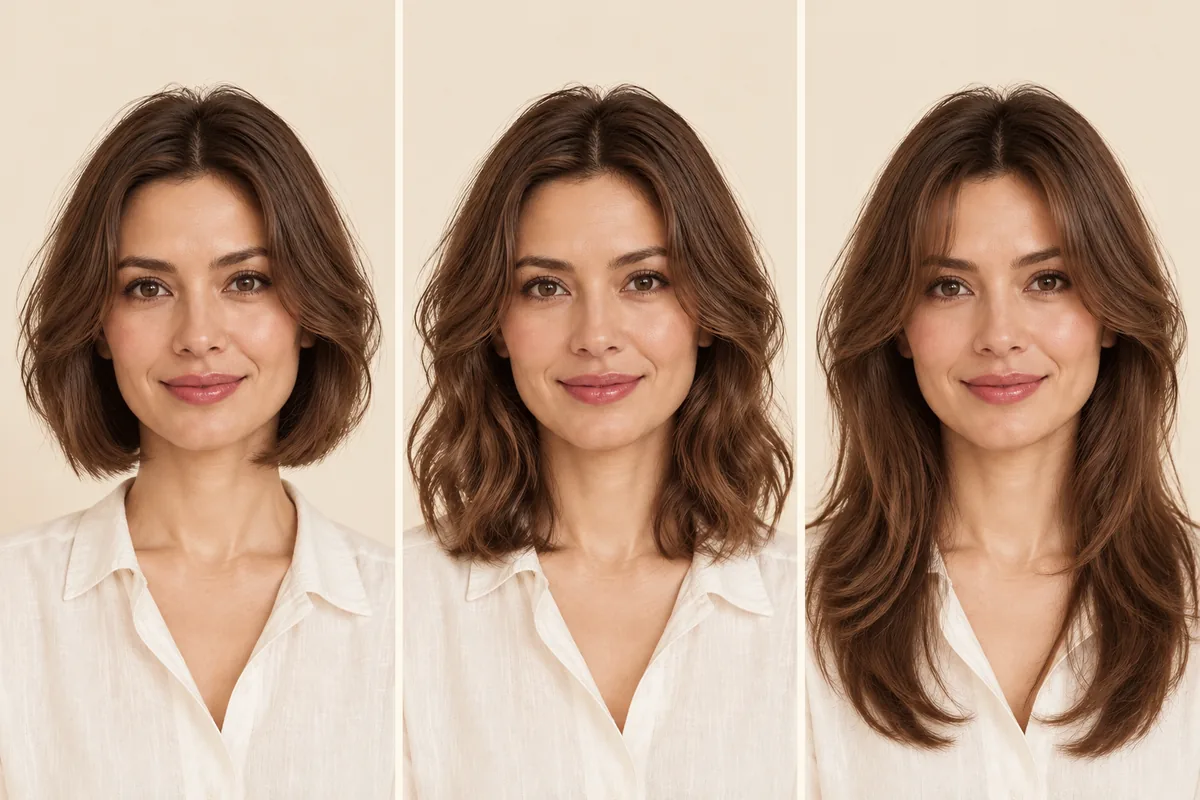
AI-generated editorial illustration: compare the jaw-length outline, shoulder-level volume, and forehead opening. These are hairstyle examples, not outputs from different tools.
What each product documents
WigTryAI: guided discovery when you do not have a style in mind
The Best Hairstyle for My Face workflow is a starting point for exploring visible length, fringe, and face-framing directions. Its suggestions come from WigTryAI's catalog, so a particular bob or fringe is not guaranteed to appear in the shortlist.
Use the reasons to decide what to preview, then inspect the completed images. Each selected image is a generation task with its own credit cost. The suggestions and previews cannot establish your real hair density, growth pattern, or styling effort; discuss those practical details with a stylist.
YouCam Online Editor: presets, references, and linked analysis
The YouCam AI Hairstyle Changer documents a browser workflow with hairstyle presets, uploaded hairstyle references, selection of multiple styles before generation, and comparison with the original photo. Its page also links a face-shape analysis tool for suggestions.
These features cover several stages of choosing and previewing a hairstyle. The practical question is how the linked analysis, hairstyle selection, and saved results fit together for your account. We have not tested that transition.
Keep the scope precise: this entry concerns YouCam Online Editor. Mobile YouCam apps and Perfect Corp's business APIs have their own features and terms; a capability advertised for one is not evidence that it is available in all of them.
WigMirror: recommendations within a wig-focused workflow
WigMirror's recommender accepts a photo for wig suggestions. Its product overview also describes try-on and configuration of length, texture, color, and cap type.
That makes it relevant when your question concerns a wig-inspired appearance rather than only a haircut. What remains untested here is how its suggestions connect to a controlled preview or a subsequent revision.
A pictured cap type or material selection does not verify the fit, construction, density, or fiber quality of a real wig. Use those labels to understand the advertised controls, not as a physical product assessment.
HairColorChangeAI: direct entry points for named styles
HairColorChangeAI's Bob Filter lists options including A-line, blunt, and layered bobs. Its separate Bangs Filter includes curtain, wispy, and blunt bangs.
These are clear entry points when you already have a category in mind. Selecting “A-line bob,” however, does not by itself establish that every output will match your intended angle and length. Nor do separate category pages prove that the service offers a unified four-style recommendation process.
For a specific cut, check both the label and the available controls. The difference between a short bob and a longer bob can matter more to your decision than the number of filters a site lists.
ChatGPT: describe the question and the edit
OpenAI's image-input documentation describes attaching images to a ChatGPT web conversation. Its image-generation documentation also explains requesting edits to an attached image and refining a result with instructions. Web image availability depends on the plan and workspace settings.
You can start by asking for hairstyle directions, then request a particular change on the photo. For example: “Suggest four different lengths and explain the visible framing tradeoffs. Do not generate an image yet.” A later request can specify the cut and what should remain unchanged. This is a suggested prompt, not a tested result.
The conversation gives you room to describe an unusual combination. Whether it produces a useful hairstyle or keeps your face consistent requires inspecting the actual output; neither is established by the existence of an editing feature.
Gemini: uploaded-image editing with follow-up requests
Google's Gemini image-editing help documents uploading an image, asking for changes, and editing an image already generated in Gemini. Availability depends on supported countries and languages, sign-in, age requirements, and account conditions.
That makes Gemini another option for describing a haircut in natural language and requesting a later adjustment. For example, a follow-up could ask for longer side pieces while keeping the original color. We have not evaluated how reliably it follows that instruction.
Check the model actually available in your session and the current usage limits. A model name or allowance from an older tutorial should not be treated as a promise for every current account.
Costs: compare the action you want to complete
The following are published credit rules checked on November 7, 2026—not charges observed in a test account. Regional offers, eligibility, and terms can change.
| Product | Published cost information | Decision implication |
|---|---|---|
| WigTryAI | Selected recommendation previews consume image credits; its consumer offer uses credit packs | A shortlist is not a promise that all its previews are free |
| YouCam Online Editor | The hairstyle page states 5 starting credits for new accounts and 2 credits per generated style | That starting allowance covers two such previews, not an unlimited comparison |
| WigMirror | Its pricing page lists 5 points for one image, 8 for two, 11 for three, and a free text recommendation option | Text suggestions and image versions have different costs |
| HairColorChangeAI | The bob and bangs pages show 10 credits per image; its pricing page states 15 starting credits | Check the per-action cost and whether the displayed paid price is billed annually |
| ChatGPT and Gemini | Access is tied to the applicable account, plan, and usage limits | Do not convert a monthly subscription into a guaranteed cost per hairstyle image |
If you plan to publish a preview, check usage rights as well as price. YouCam Online Editor's specific terms distinguish Pro output from free and pay-as-you-go credits for commercial use. Paying for credits alone does not establish permission for every use.
Privacy: read the rule for the exact service
Before uploading, look for who processes the photo, how long originals and results remain, whether training use is covered, and what deletion actually does. “Not public” and “not stored” mean different things.
- WigTryAI: its privacy policy states that original selfies are deleted from its storage within 24 hours and generated previews within one year. It also describes AI service providers, sharing choices, and broader deletion requests. These are policy statements, not deletion behavior measured for this article.
- WigMirror: its policy distinguishes on-device face-shape analysis from uploaded try-on photos and gives a saved-to-account exception to the 24-hour photo-deletion statement. Do not read “on-device” as a description of every feature.
- HairColorChangeAI: its policy says originals and results are stored under the account and sent to an AI provider. Hiding an item from history does not erase the storage copy; the policy directs storage-deletion requests to support.
- YouCam: use the YouCam policy and terms applicable to Online Editor. We could not confirm a current Online Editor retention duration from its directly retrieved FAQ, so this guide gives no fixed deletion-time promise.
- ChatGPT and Gemini: review the data controls for the account you use. Google's Privacy Hub distinguishes Activity settings, temporary chats, and feedback. Turning off an activity setting should not be assumed to mean immediate deletion. We have not established a complete consumer ChatGPT photo-retention comparison here.
Choose by your next action
Decision guide
Match the workflow to the question
| Your next action | Workflow to look for | Check before committing |
|---|---|---|
| I need hairstyle ideas | Recommendations with specific reasons and a route to previews | Are the suggestions distinct, and what do their previews cost? |
| I want this named cut | An exact preset, a reference image, or a clear text-edit request | Can you control the length, fringe, and original color? |
| I want to refine one detail | An editing control or a follow-up conversation | Does the revision preserve everything you wanted to keep? |
| I want to compare several looks | A batch view, saved results, or a documented export process | Can you revisit the same photo and see all the options clearly? |
You do not have to choose one category for every task. A conversation can help you describe an idea; a catalog can help you name it; a preview can help you discuss its visible shape with a stylist. The useful distinction is how the product organizes those actions. Advice quality and image quality remain separate questions.

AI-generated consultation scene: a reference image can help explain length and face framing. Discuss your real texture, density, and upkeep with a stylist before deciding on a cut.
If your question is “what should I try?”, WigTryAI gives you a concrete next step: review four explained suggestions, choose the directions you want to preview, and compare the completed looks. For practical comparison criteria, read how to try hairstyles online.
Get four hairstyle ideas before choosing a preview
Upload one selfie, read the reasons, select 1–4 looks to generate, and compare your completed previews in WigTryAI. Image credits apply; previews are visual references for exploring a direction.
Get my four hairstyle suggestionsFAQ
Which AI hairstyle recommendation tool can I use without writing prompts?
WigTryAI offers a guided recommendation workflow without requiring hairstyle prompts: upload a selfie, receive four catalog suggestions with reasons, and select 1–4 looks to preview. Image credits and account access apply. Other dedicated tools also offer guided choices; check whether their recommendation and preview steps fit what you want to do.
What is WigTryAI's advantage over ChatGPT and Gemini for hairstyle ideas?
WigTryAI connects catalog recommendations, reasons, preview selection, and comparison in one hairstyle-focused flow. This suits someone who wants named choices and a route to previews without writing hairstyle prompts. Image credits and account access apply. ChatGPT and Gemini also support uploaded photos and image-editing requests; this article does not establish that WigTryAI produces more accurate advice, better images, or faster results.
What is the difference between hairstyle recommendation and virtual try-on?
Recommendation suggests directions to consider and may explain why. Virtual try-on creates a visual reference of a selected direction on your photo. They can be connected, but receiving suggestions does not mean image previews are included or free.
Can ChatGPT suggest hairstyles and edit my photo?
ChatGPT accepts image inputs, and its official documentation describes requesting image edits in a web conversation. You can ask for hairstyle ideas or describe a cut to preview. Image access depends on your plan and workspace settings; this article does not establish the quality of the resulting advice or edits.
Can Gemini change a hairstyle and then adjust it?
Gemini's official help supports editing an uploaded image and requesting changes to a generated image. Hairstyle changes can be described in those requests, subject to the account's available features and usage limits. We have not tested the accuracy of a cut or a follow-up adjustment.
Which tool keeps my face the same?
This source-based comparison cannot identify the most consistent tool. Asking an editor to preserve your face is an instruction, not a guarantee. Inspect whether facial proportions, expression, skin details, hairline, and non-hair parts changed before using a preview as a reference.
Are AI hairstyle tools free to use?
Some advertise starting credits or limited access. The number of free credits is different from the number of images, and recommendations may have a separate cost from previews. Check the current per-action charge, eligibility, subscription limits, and export conditions for your account.
Are uploaded photos automatically deleted?
There is no single rule across these services. Retention can differ for originals, generated results, saved items, and shared links. Read the exact policy and deletion process; removing an image from visible history does not necessarily remove its stored file.