How to Try On a Wig From a Product Photo Before Buying
Yes—you can try on a wig from a product photo before buying by using the image as a hairstyle reference. You need the wig photo and a portrait of yourself. The AI result previews a similar style direction; it does not verify the actual wig's fit, materials, or exact appearance.
Yes. Save a clear wig image you have permission to use, then upload it as a hairstyle reference alongside your own portrait in WigTryAI. An Amazon, Etsy, Temu, or AliExpress image can provide the visible style direction. The generated result is not an exact rendering of that item: it cannot verify cap fit, lace construction, density, fiber quality, or installation.
Two inputs
Wig reference photo + your portrait
Input method
Upload an image file, not a product-page link
Compare
Length, part, silhouette, color direction
Keep separate
Visual preference and physical product checks
A product photo provides a style reference, not a product measurement. It can show the outline of a bob or the direction of a wave; it does not tell the generator your head circumference or what the fiber feels like. Keep that distinction in mind while you follow the steps below.
How to Use a Wig Listing Photo for a Try-On
1. Save a clear image you have permission to use
Choose one image with the complete hairstyle visible. A front-facing photograph gives you the part, hair around the face, and overall outline in one frame. If you use a screenshot, crop away navigation, prices, and unrelated images without cutting off the top or ends of the hair. Avoid stretching the image to change its proportions.
2. Open the wig page and enter the try-on flow
Start at virtual wig try-on, then select Try a Wig Style Free to enter the try-on flow. The article and wig landing page explain the process; the image upload happens in the try-on interface. You do not need to paste an Amazon product-page URL.
3. Choose Upload Style and add both photos
Select Upload Style in the look picker and upload your saved wig photo as the reference. Add one clear, front-facing portrait of yourself as the selfie. Keep your eyes and face visible, use even lighting, and avoid hats or heavy beauty filters. The reference supplies the hair direction; the portrait supplies the person and scene.
WigTryAI is accessed through a web browser, with no app download required. Image generation uses an AI service; it is not performed entirely on your device. Your first generation can be anonymous. Additional generations may require sign-in and available credits; see the account and payment answer below before assuming all free previews are anonymous.
4. Generate, then check the result before comparing styles
Check whether the result still resembles your portrait and whether it follows the reference's part, outline, and color direction. If the image changes your face substantially or loses the hairstyle you were trying to inspect, do not use it to judge the wig. Try a clearer reference rather than treating the most flattering result as the most reliable one.
Have the two images ready?
Open the wig try-on page, enter the flow, and choose Upload Style. Add your wig reference and portrait to preview the style direction before buying.
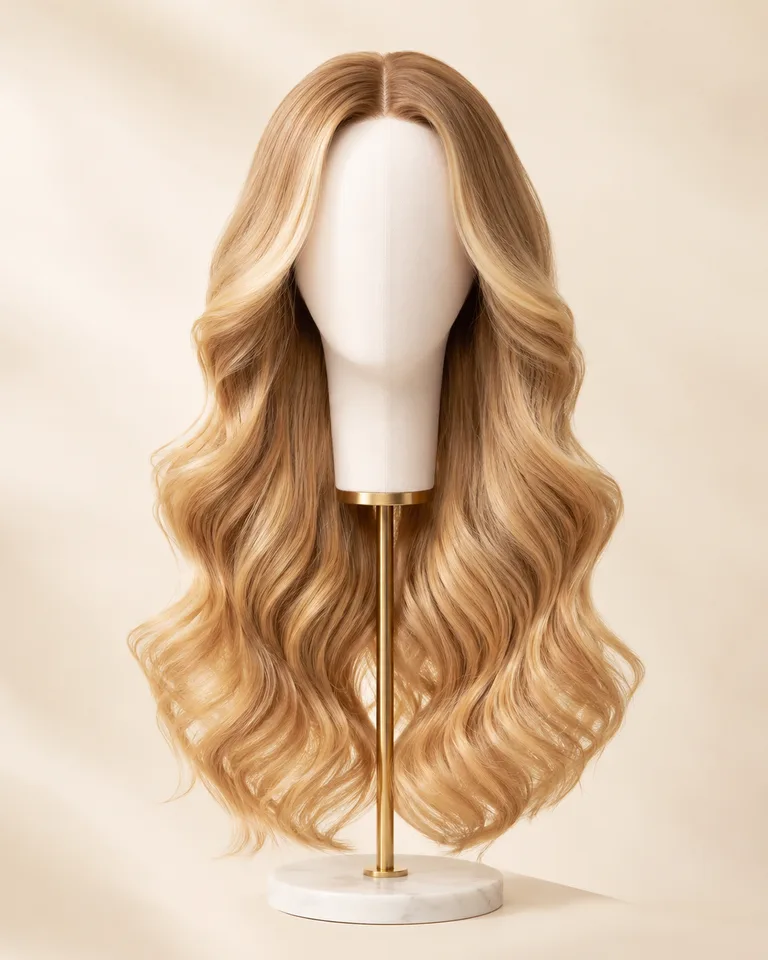
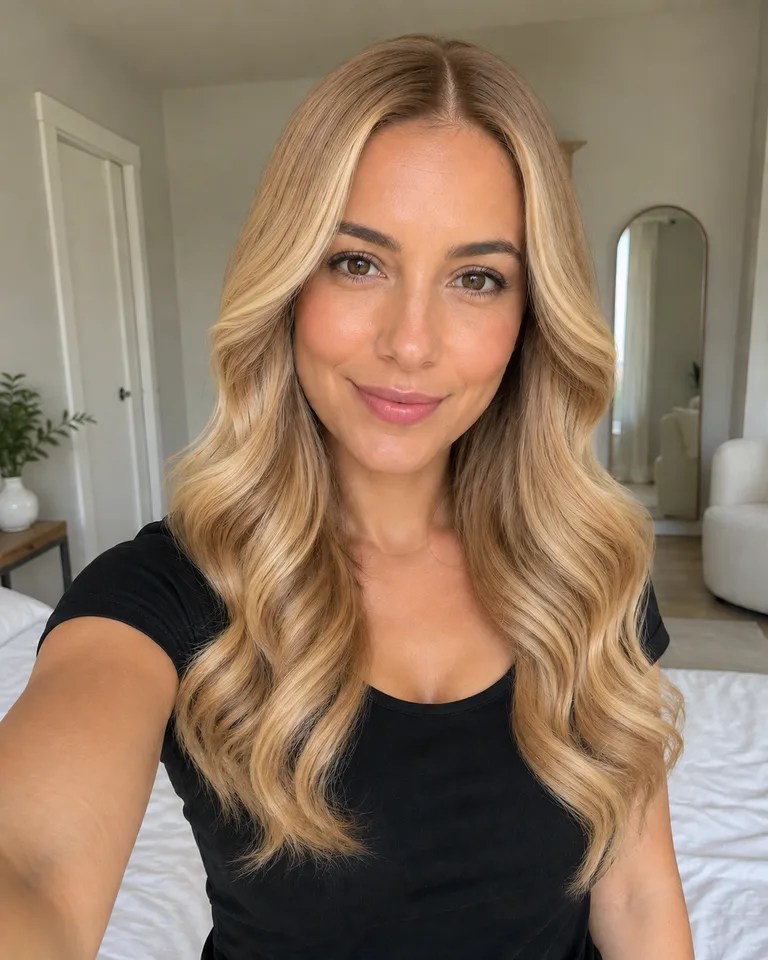
This example uses two existing WigTryAI demo images: a brown-haired portrait and a honey-blonde wig on a display head. They are demonstration assets, not a customer upload or a real Amazon listing. We used them as the two inputs to WigTryAI's reference-image generation pipeline.
Visual comparison
Reference photo, original portrait, generated preview
Read these as three separate images: the requested hair direction, the unchanged input portrait, and the actual AI output.
1. Wig reference
Center-parted honey-blonde waves on a fabric display head; the hair outline is visible.
2. Original portrait
The input portrait has straight brown hair, a black shirt, and a bedroom background.
3. WigTryAI output
The generated preview can be checked against both inputs; it is not a photograph of someone wearing the physical wig.
In this result, the original shoulder-length brown hair becomes long, light-blonde waves that fall below the shoulders. The black shirt and bedroom remain recognizable. The reference's broad wave direction carries over, but its centered part shifts slightly to one side and the wave arrangement changes around the face and shoulders. The output also reads less golden than the display-head reference. Those differences are visible reasons to treat this as a similar style direction, not an exact product image.
How this example was made: one portrait and one reference image were used for a single successful WigTryAI reference-image generation on October 1, 2026. The public images are resized WebP copies; the original output and an input/output hash record are retained with the project. This is a single demonstration, not an accuracy test, a measurement of a physical wig, or a guarantee that every input will produce the same result.
Which Product Photo Should You Use?
Choose the photo for the detail you want to compare, not for how polished it looks. A clear display-head photo can be more useful than a model image that hides half the hair behind a shoulder.
Decision guide
Choose a reference that shows the whole style
These are image-selection cues, not quality scores for sellers or wigs.
Photo type
Useful for
What may be missing or misleading
Clear front-facing model photo
Part, front pieces, overall hair outline
The model's face and styling are different from yours
Front-facing display-head photo
Part and visible outline without a model's face
Human scale and the way the hair falls on shoulders
Side-view photo
Side layers, wave direction, visible length
The front part and both sides of the face frame
Collage or infographic
Finding a better single photo in the listing
Multiple views, labels, or small crops can obscure the intended reference
Cropped, obstructed, or heavily filtered photo
At most, a rough texture or color idea
Missing ends, hidden part, and altered color or detail
Save a single view rather than a grid of several angles. Keep the visible hairstyle intact when cropping. If the only image shows the back of the wig, use it to inspect the back outline; find a front view before judging how the style frames your face. JPG, PNG, and WebP reference images are supported.
Using Photos From Amazon, Etsy, Temu, and AliExpress
Amazon: choose a reference from the image gallery
For an Amazon wig try-on, open the listing's image gallery and look for one view with the part and full hair outline visible. For example, if the first image is a four-panel collage but a later photo shows the whole wig on a display head, save the later image as your reference. Check that it corresponds to the color and length option you are considering; a different option's image gives you a different style to preview.
Upload that image file through Upload Style. WigTryAI does not import the Amazon listing, identify its product variant, or connect the generated result to stock, measurements, or seller claims. This is an independent image-reference workflow, not an Amazon integration.
Etsy: use the image for the unit or variation you mean
If an Etsy listing includes several custom examples, choose the photo that corresponds to the style you want to preview. Do not assume a collage or a photo of another finished unit represents every available variation. Details about a custom unit still need to come from the maker.
Temu and AliExpress: check the selected image and option
The same two-image workflow applies to a photo from Temu or AliExpress. Match the saved image to the selected style, length, and color where possible. If the listing and its options are unclear, a generated image cannot resolve that ambiguity. The platform name does not change what the AI can verify.
Only upload images you have permission to use. Mentioning these marketplaces does not imply a partnership, endorsement, or an automatic connection to their catalogs.
How to Check the Generated Preview
Read the image in this order:
Person and scene. Compare your eyes, face outline, expression, clothing, and background with the original. The generator aims to preserve them, but may alter details.
Reference silhouette. Does the result retain the requested part, front pieces, wave direction, and overall outline? A prettier style that ignores the reference answers a different question.
Length and face framing. Observe where the ends and shortest pieces fall relative to the jaw, shoulders, and collarbone. Do not read those pixels as a precise inch measurement.
Color direction. Compare warm or cool, light or dark, and overall contrast. Screens, lighting, and generation can shift the exact shade.
To compare two references, keep the original portrait the same and change the reference image. Reusing the portrait removes one source of variation, but does not guarantee identical lighting, facial detail, or framing in the generated outputs. Check those differences again each time.
What the Preview Cannot Verify
A useful preview can help you decide which visible direction you prefer before buying. Physical checks remain separate:
Cap fit and comfort: measure your head and confirm the seller's cap dimensions and adjustment details.
Lace and installation: examine real close-up photos and construction details. Generated hairline pixels cannot prove lace realism or how the unit will sit after installation.
Density and fiber quality: ask about construction and fiber, and inspect physical-product evidence. A full-looking generated style cannot establish actual density, shedding, tangling, or softness.
Exact color: use the preview for color direction, then check the seller's shade information or a sample when available.
Behavior after wearing or washing: a still image cannot establish movement, care requirements, curl changes, or styling effort.
The first-wig guide covers the broader construction and sizing questions. For the specific differences between cap designs, see lace front vs full lace wigs. Keep the reference-image preview for the part it can help with: exploring the visible hairstyle on your own portrait.
FAQ
Can I use a screenshot of a wig product photo?
Yes, if you have permission to use the image. Crop away navigation, text, and unrelated photos while keeping the full hair outline visible. A clean single image gives you a clearer reference than a screenshot of the whole product page.
Can I paste an Amazon product link to try on the wig?
No. This workflow takes an image reference, not an Amazon product-page URL. Save an appropriate image, open the wig try-on flow, and choose Upload Style to upload it alongside your portrait. WigTryAI does not import the listing's price, options, or product specifications.
Can I use a photo of a wig on a display head?
Yes. A clear front-facing display-head photo can show the part and hairstyle outline without a model's face. It does not show human scale or how the physical wig falls on your shoulders, so check the generated result for those differences rather than assuming an exact match.
Why does the result look different from the reference wig photo?
The AI interprets the visible hairstyle on a different portrait; it does not render a measured physical product. Angle, obscured hair, lighting, and generation variability can change the silhouette, texture, length, or color. If it changes your face substantially or loses key reference details, use another clear image and treat the first result as unreliable for that comparison.
Do I need an account or payment to use the reference-image preview?
Your first generation can be anonymous, and your first 3 try-ons are free; additional generations may require sign-in and available credits. Free does not mean unlimited or that every free generation is anonymous. The interface shows access and credit requirements. Original customer selfies are deleted from WigTryAI storage within 24 hours, while generated previews are deleted within one year; see the privacy policy and credit information for details.
How do I compare two wig product photos on the same portrait?
Reuse the same original portrait and generate a separate preview for each reference image. First check whether both outputs preserve your face and follow their references, then compare length, part, face framing, and color direction. Differences introduced by the AI are not evidence that one physical wig has better fit or quality.