WigTryAI

2026-07-06

12 Wig Try-On Websites & Apps Compared (2026): Which One Actually Helps You Decide?

A hands-on comparison of 12 wig try-on websites and AI hairstyle apps, with real screenshots from each tool. Covers retailer try-on tools, general hairstyle apps, and web-based preview tools — so you can pick the right one for your decision.

Wig try-onAI hairstyleTool comparisonVirtual try-on

Last updated: July 2026 · 12 min read

Written by the WigTryAI team. WigTryAI is our product, so we identify it clearly rather than presenting this as an independent ranking. Screenshots captured: July 5–6, 2026. Product features and policies can change; confirm current terms before uploading a photo or making a purchase.


Introduction: The Problem With "Just Look at the Model Photos"

Shopping for a wig online is hard. You're looking at a model with different face shape, different skin tone, different lighting — and you're supposed to imagine how that exact same wig will look on you. Even with high-quality product photography, the gap between "looks great on the model" and "looks right on me" is real.

This is why virtual wig try-on tools exist. The promise is simple: upload your photo, preview different styles, and make a more confident decision before spending $200–$2,000 on a wig.

But here's the problem: not every "wig try-on" tool works the same way. Some are connected directly to wig retailers and let you preview actual products from their catalog. Others are general hairstyle apps that focus on cuts, colors, and AI-generated transformations — useful for inspiration, but not tied to any real wig inventory. And some sit in between, offering style exploration without the retail context.

This guide compares 12 tools across three categories, with real screenshots from each platform, so you can see what you're actually getting before you commit your time (or your photo).


How We Compared These Tools

We didn't upload the same portrait to every service or assign star ratings based on marketing claims. Instead, we visited each tool's public-facing page on July 5–6, 2026, and evaluated them on four practical dimensions:

Dimension What We Looked At
Product Linkage Is the tool connected to a real wig catalog, or is it general style exploration?
Access Method Web browser, mobile app, or both? Does it require sign-up?
Selection Method Preset library, text prompt, reference image, or catalog browsing?
Decision Support Does it help you actually decide — with side-by-side comparison, history, notes, or expert guidance?

We also checked whether each tool has free access, what its main limitations are, and whether it's more suitable for "I already know which retailer" vs. "I'm still exploring what direction I want to go."


Quick Comparison: All 12 Tools at a Glance

Tool Type Platform Product-Linked Best For
MyFirstWig Wig retailer Web ✅ Yes Previewing lace wigs from their catalog
Wig Studio 1 Wig retailer Web ✅ Yes Education + virtual try-on + consultation
Dani & Ro / Godiva's Secret Wigs Wig retailer Web ✅ Yes Comparing wig colors on your photo
RPGSHOW Wig retailer Web ✅ Yes AI-powered wig preview before ordering
Klaiyi Hair Wig retailer Web ✅ Yes Mobile-friendly human hair wig try-on
Wigs.com Wig retailer Web ✅ Yes Expert video consultation (human, not AI)
YouCam Makeup Beauty app App + Web ❌ No Polished beauty ecosystem with hairstyle features
Hair Zapp Hairstyle app App ❌ No Browsing 700+ hairstyles quickly
Hairstyle Try On Hairstyle app App (iOS) ❌ No Structured style packs with face-shape tips
BeautyPlus AI editing tool Web + App ❌ No Quick AI hair and color exploration
FaceApp Photo editing app App ❌ No Casual hairstyle and color edits
WigTryAI Web-based AI Web ❌ No Style exploration, no app or retail flow

Category 1: Wig Retailer Websites — Best for Product-Linked Try-On

These tools are connected to a real wig catalog. When you try on a style, you're previewing something you can actually buy. This is the most practical category if you're seriously shopping for a wig.


1. MyFirstWig Virtual Try-On Center

MyFirstWig offers a browser-based AI virtual wig try-on experience. According to their public page, users can upload a clear photo, search for up to six wig styles at a time, and preview different styles and colors in a single session. The tool is free for MyFirstWig customers, with a stated limit of up to five styles per day.

The key differentiator: this is a no-app-required, mobile-browser-compatible experience tied directly to their lace wig inventory. You're not trying on generic hairstyles — you're previewing products with specific SKUs.

Best for: Users who want to preview actual MyFirstWig lace wig styles before ordering.

Strengths:

Watch out for:

Note: MyFirstWig's virtual try-on page uses Cloudflare protection, which prevented us from capturing a live screenshot at the time of writing. Visit myfirstwig.com/virtual-try-on-center to see the current interface.


2. Wig Studio 1 — Education, Try-On, and Expert Guidance Combined

Wig Studio 1 takes a different approach from most online wig retailers. Instead of positioning virtual try-on as the only decision tool, they combine it with education, consultations, product transparency, and community.

Their guide page explains their philosophy clearly: buying a wig online is not like buying a sweater. It's a confidence decision, often tied to hair loss, medical needs, or significant personal investment. So they offer a layered support system — virtual try-on technology, free one-on-one video consultations, live shopping showcases, and an education-first approach that teaches you about cap construction, lace types, density, and color matching before you buy.

Wig Studio 1 guide page showing their education-first approach, virtual try-on features, and comprehensive consultation services Wig Studio 1's expert guide emphasizes education, virtual try-on, and personalized consultation as part of the buying process — not just a quick preview tool.

Best for: Users who want both visual preview and expert human guidance — especially first-time wig buyers or people with medical hair loss concerns.

Strengths:

Watch out for:


3. Dani & Ro / Godiva's Secret Wigs — Simple Product-and-Color Try-On Flow

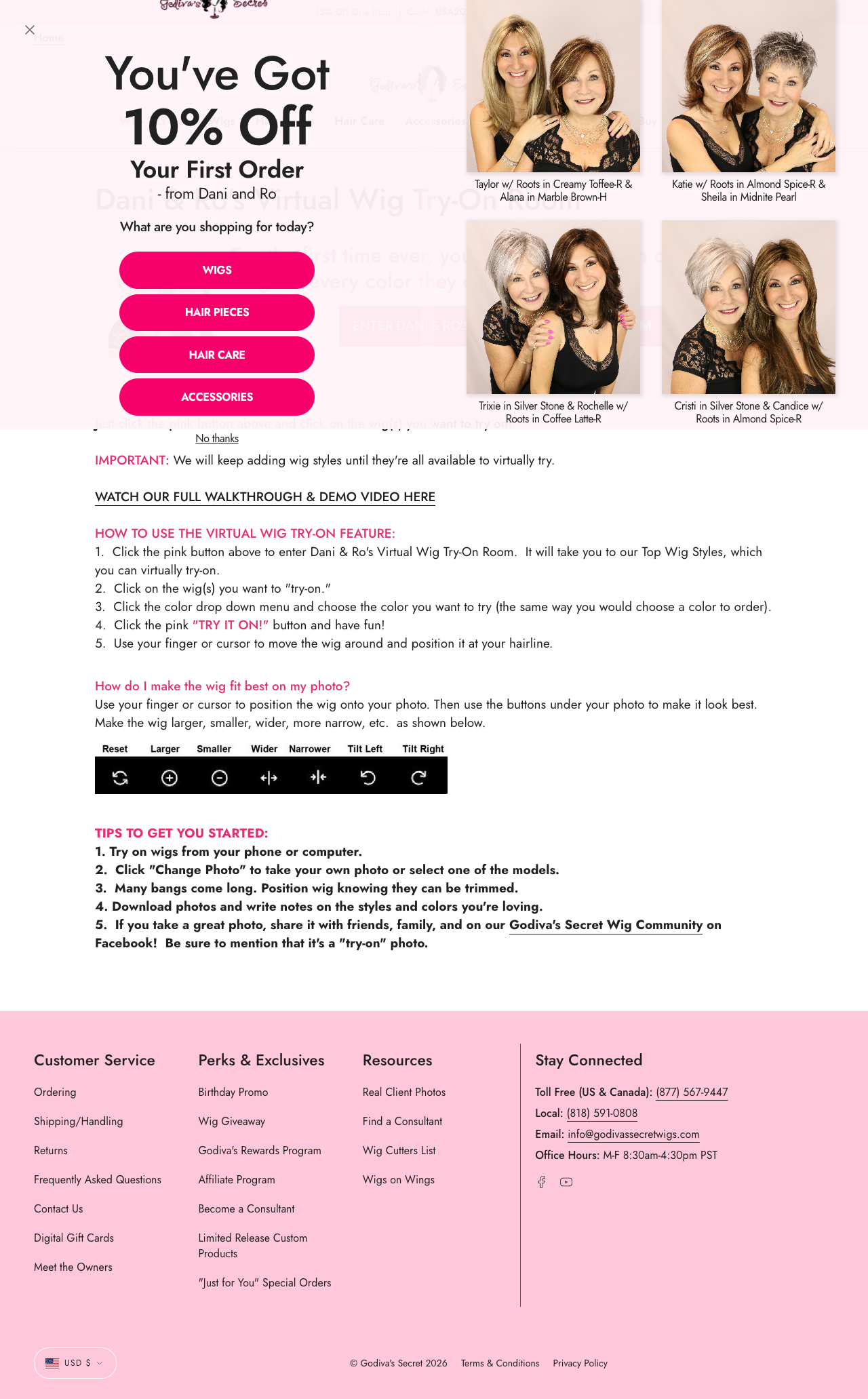
Godiva's Secret Wigs offers one of the most straightforward virtual try-on experiences. Their "Dani & Ro's Virtual Wig Try-On Room" page walks you through a clear five-step process: click to enter the try-on room, choose a wig style, pick a color from a dropdown, hit the pink "TRY IT ON!" button, and then position the wig on your photo using your finger or cursor.

What stands out is the practical, user-friendly design: you can resize, widen, narrow, or tilt the wig overlay to get the best fit on your photo. The page even includes adjustment controls for making the wig larger, smaller, wider, narrower, and tilted — going beyond a simple one-click overlay.

Godiva's Secret Wigs Virtual Wig Try-On Room showing step-by-step instructions, TRY IT ON button flow, and wig adjustment controls Dani & Ro's Virtual Wig Try-On Room: simple step-by-step flow with wig style selection, color dropdown, "TRY IT ON!" button, and manual adjustment controls for positioning and resizing.

Best for: Users who want to compare color options within a wig catalog, with a simple, guided flow.

Strengths:

Watch out for:


4. RPGSHOW Virtual Try-On Center

RPGSHOW describes its virtual try-on tool as AI-powered, letting users upload a photo and preview different wig styles and colors before ordering. Like MyFirstWig, it's a retailer-first tool — designed to help you choose from their actual product catalog rather than explore general hairstyle ideas.

Best for: Users considering RPGSHOW wigs who want an AI preview before committing to a purchase.

Strengths:

Watch out for:


5. Klaiyi Hair AI Try-On — Mobile-Friendly Product Try-On

Klaiyi Hair's AI Try-On page is designed for a mobile-first experience. Users can take a photo directly or upload from their album, then browse a gallery of wig styles organized by product name. The interface shows a horizontal scrollable row of wig thumbnails with product names — "Klaiyi 7x5 No Slip Glueless," "Klaiyi Ombre Chestnut," "Klaiyi Balayage Brown French," and more — each representing an actual product in their catalog.

Klaiyi Hair AI Try-On page showing the "Pick Your Preferred Wig Style" gallery with product thumbnails, photo upload area, and wig style selection interface Klaiyi's AI Try-On interface: upload a photo, then browse a gallery of actual wig products to preview on your image. The horizontal scroll shows named products with thumbnails.

Best for: Users who want a mobile-friendly, product-oriented try-on flow for human hair wigs.

Strengths:

Watch out for:


6. Wigs.com — When Human Expertise Beats AI

Wigs.com is one of the largest wig retailers online, but their approach to "try-on" is deliberately human rather than AI-driven. Instead of a universal AI try-on tool, they offer free one-on-one video consultations with hair experts.

Their "Free Video Consults" page lets you book three types of consultations: Wig Consultation, Topper Consultation, and Try-On / Care Consultation. Each is a live video call with a trained expert who can guide you through style selection, fit, color matching, and care questions.

Wigs.com Free Video Consults page showing three consultation booking options — Wig, Topper, and Try-On/Care — along with the expert team and value proposition about personalized guidance Wigs.com's consultation page: book a free one-on-one video call with a hair expert for wig, topper, or try-on/care guidance — human expertise over AI preview.

This is important: for many wig buyers — especially first-timers, people with medical hair loss, or anyone spending significant money — a 15-minute video call with someone who has seen thousands of wig fittings may be more valuable than an AI-generated preview.

Best for: Users who need fit, cap, color, or topper guidance from a trained human consultant.

Strengths:

Watch out for:


Category 2: Hairstyle and Beauty Apps — Best for General Look Exploration

General hairstyle apps are useful when you want to explore a new look, haircut, hair color, bangs, or overall style direction. They are not connected to real wig inventory, so use them for inspiration — not for deciding which specific wig to buy.


7. YouCam Makeup — The Beauty Ecosystem Powerhouse

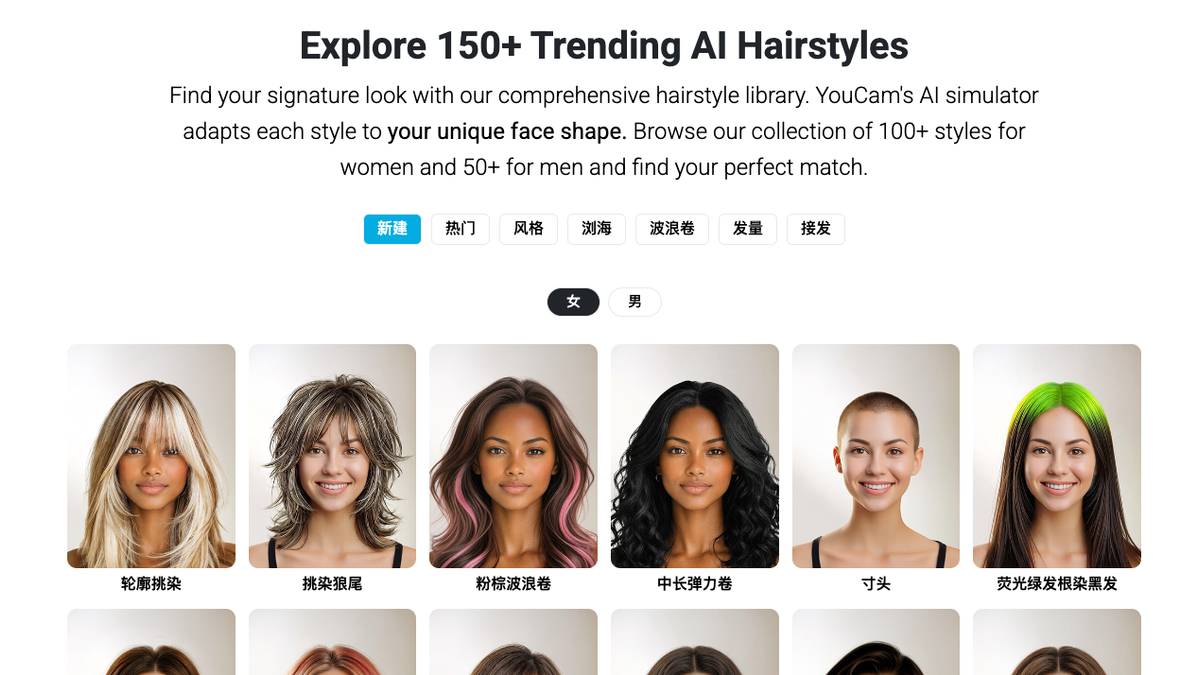
YouCam Makeup by Perfect Corp is one of the most widely installed beauty apps globally, trusted by over 300 million users. Its dedicated AI Hairstyle tool page advertises 150+ hairstyles for men and women, accessible both through the mobile app and a web-based editor.

YouCam's ecosystem spans makeup, hair, skin analysis, and AI-powered editing — meaning the hairstyle feature sits inside a much broader beauty tool. This is both a strength (you get more than just hair) and a limitation (it's not specialized for wig decisions).

YouCam AI Hairstyle Generator interface showing the 150-plus hairstyle library, three-step workflow, and upload entry point YouCam's AI Hairstyle Generator advertises 150+ styles with a guided three-step workflow: upload, select, preview.

Best for: Users who want a polished beauty-app experience with hair, makeup, and selfie editing in one place.

Strengths:

Watch out for:


8. Hair Zapp — The Community Hairstyle Browser

Hair Zapp positions itself as a hairstyle community, offering 700+ hairstyles in different lengths, colors, and styles. It's designed for quick browsing and style discovery — think of it as a virtual hairstyle catalog rather than a precision try-on tool.

Best for: Users who want to browse many hairstyle options quickly for inspiration.

Strengths:

Watch out for:


9. Hairstyle Try On — Structured Style Packs With Face-Shape Guidance

The Hairstyle Try On app (by KBMSoft ApS) is an iOS app with a clear freemium model: 33 free hairstyles included, with paid style packages unlocking more than 750 additional styles and 50+ hair color options. The App Store listing (4.0 stars, 6.9K ratings) emphasizes face-shape analysis and hairstyle tips as part of the experience.

Hairstyle Try On App Store page showing app screenshots, 33 free hairstyles + 750 paid styles, and face-shape guidance features Hairstyle Try On's App Store listing: 33 free styles, paid packages with 750+ total styles, face-shape tips, and 50+ color options.

Best for: Users who want structured hairstyle packs, face-shape-oriented recommendations, and are comfortable with in-app purchases.

Strengths:

Watch out for:


10. BeautyPlus AI Hairstyle Changer — Fast, Free, Browser-Based Exploration

BeautyPlus offers a web-based AI Hairstyle Changer that requires no sign-up and no app installation. Their page emphasizes four value propositions: realistic AI-powered blending, completely free access, a large built-in template library (bangs, bobs, layered cuts, curly/straight), and no software installation required.

The experience is straightforward: upload a photo, choose from preset templates or write a custom prompt, and the AI generates a hairstyle preview. The tool also supports hair color changes, bang filters, and customization options for length, texture, and style.

BeautyPlus AI Hairstyle Changer page showing the upload interface, "Try on Hairstyles Online" heading, and key features like realistic blending and free access BeautyPlus AI Hairstyle Changer: web-based, free, no sign-up required — with preset templates and custom prompt options for hairstyle and color exploration.

Best for: Users who want quick, free AI hairstyle exploration without focusing on wig products.

Strengths:

Watch out for:


11. FaceApp Hair Filters — Casual Photo-Editing Style Changes

FaceApp's hair filters are an extension of its broader photo-editing capabilities. Their blog post describes the feature as a way to "preview hairstyles and colors before committing — realistic results, instant edits, and zero risk." The app uses AI try-on technology to blend hairstyles and colors with your facial features.

FaceApp is fundamentally a photo-editing app, not a wig shopping tool. The hair filters are one feature among many (age filters, beard filters, makeup, smile edits, etc.), and they're designed for quick, casual transformations rather than detailed product comparison.

FaceApp Hair Filters blog page showing before/after transformations, "Virtual Hairstyle Try-On" section, and explanation of the risk-free preview concept FaceApp's hair filters blog: the app positions hair transformations as risk-free previews — useful for casual exploration, but not tied to real wig products.

Best for: Casual users who want quick hairstyle and color edits in a photo-editing context.

Strengths:

Watch out for:


Category 3: WigTryAI — Web-Based AI for Style Exploration (Our Tool)

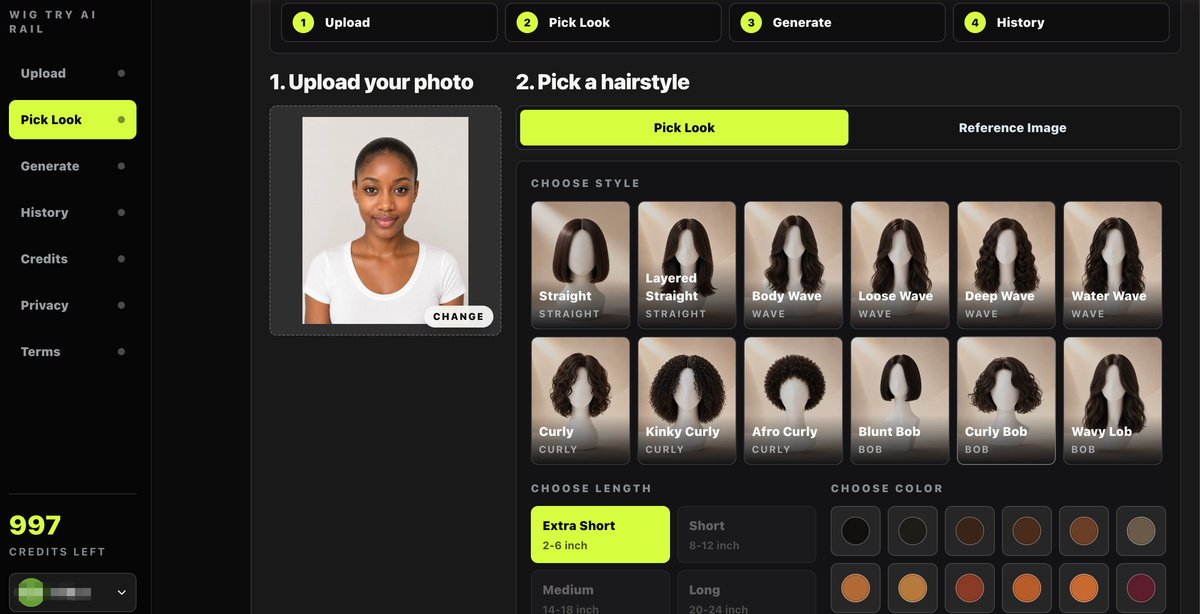
WigTryAI sits between product-specific wig try-on and general hairstyle apps. It's a web-based AI tool that lets users upload a selfie and preview wig-inspired hairstyles, colors, lengths, and textures — without downloading an app or entering a retail flow.

WigTryAI interface showing the Pick Look screen with uploaded portrait, hairstyle gallery, length choices, and hair color controls WigTryAI's style exploration interface: compare styles, lengths, and colors from one uploaded selfie — designed for decision-making, not just a single preview.

What WigTryAI is:

What WigTryAI is not:

Best for: Users who want a simple, browser-based way to explore wig-inspired looks before deciding what direction to pursue — especially those still in the "what shape suits me?" phase.

Strengths:

Watch out for:


How to Choose the Right Tool for Your Situation

The best tool depends on where you are in your decision process, not on which tool has the most features.

If you already know which retailer you want to buy from:

→ Use that retailer's try-on tool. MyFirstWig, Wig Studio 1, Dani & Ro, RPGSHOW, Klaiyi Hair, and Wigs.com are all more practical when you've narrowed down where you're buying. These tools connect the preview to an actual product you can order.

If you're still exploring what direction suits you:

→ Use general exploration tools. YouCam Makeup, Hair Zapp, Hairstyle Try On, BeautyPlus, and FaceApp help you test bangs, curls, short cuts, long styles, and color families. Just remember: the styles you see may not correspond to real wig products.

If you want a quick web-based preview without retail commitment:

→ Use WigTryAI for style exploration. No app, no store, no sales flow — just upload a photo and compare wig-inspired looks. This is most useful as a first filter before you dive into specific retailer catalogs.

If you need expert human guidance:

→ Book a consultation with Wig Studio 1 or Wigs.com. For first-time wig buyers, people with medical hair loss, or anyone spending $500+, a 15-minute call with an expert may give you more confidence than any AI preview.


What to Check Before Trusting Any Try-On Result

Virtual wig try-on is helpful, but it has real limits. Before relying on any result — whether from a retailer tool, a beauty app, or an AI preview — check these six things:

1. Photo Quality

A clear, front-facing photo in natural, even lighting gives the best preview. Avoid heavy shadows, extreme angles, filters, sunglasses, or hair covering your face. The better your input photo, the more useful the output.

2. Product Coverage

Not every tool supports every wig type. Clearance items, headband wigs, U-part wigs, certain colors, and specific cap constructions may be excluded. Check the tool's supported product list before assuming your preferred style is available.

3. Color Accuracy

Hair color on screen can differ significantly from real life. Screen calibration, lighting in product photography, and your device's display settings all affect what you see. If color accuracy is critical, order a color ring or swatch before committing.

4. Fit and Cap Construction

No virtual try-on can show you how comfortable a cap feels, whether the lace blends with your skin, how the density looks in person, or how heat-friendly fiber responds to styling. These are physical properties that require physical experience.

5. Return Policy

For higher-value wigs, always read the return policy before ordering. Some retailers (like Wigs.com) offer generous 45-day returns with no restocking fees; others may have stricter policies, especially for clearance or customized items.

6. Real Customer Evidence

Supplement any virtual preview with real-world evidence: customer review photos (not just text reviews), YouTube try-on videos from people with similar face shapes, and — if possible — in-person or video consultations.


Conclusion: The Best Tool Is the One That Matches Your Decision Stage

The wig try-on landscape in 2026 falls into three clear categories, and each serves a different purpose:

Category Best When Examples
Retailer try-on tools You know which store you're buying from MyFirstWig, Wig Studio 1, Dani & Ro, RPGSHOW, Klaiyi, Wigs.com
General hairstyle apps You're exploring style direction broadly YouCam, Hair Zapp, Hairstyle Try On, BeautyPlus, FaceApp
Web-based AI preview tools You want quick, no-commitment style exploration WigTryAI

The most reliable approach is not to treat any single virtual try-on as the final answer. Instead, use it as your first filter: compare styles, narrow down colors, understand what shapes complement your face — then verify product details through real photos, reviews, videos, consultations, and seller information.

Virtual try-on reduces the guesswork. But the best wig decision still comes from combining visual preview with real product research. No screenshot — no matter how realistic — can replace trying the actual wig on your actual head.


Reference Sources

Try wig-inspired styles on your photo