How AI Hairstyle Try-On Works: A Practical, Model-Agnostic Guide
A model-agnostic explanation of AI hairstyle editing, from portrait and style direction to generation, preservation checks, and human review.
Last updated: July 2026 · 8 min read
Written by the WigTryAI team. WigTryAI is our product. Information checked: July 5, 2026. Product features and policies can change, and vendors rarely publish their complete production architecture.
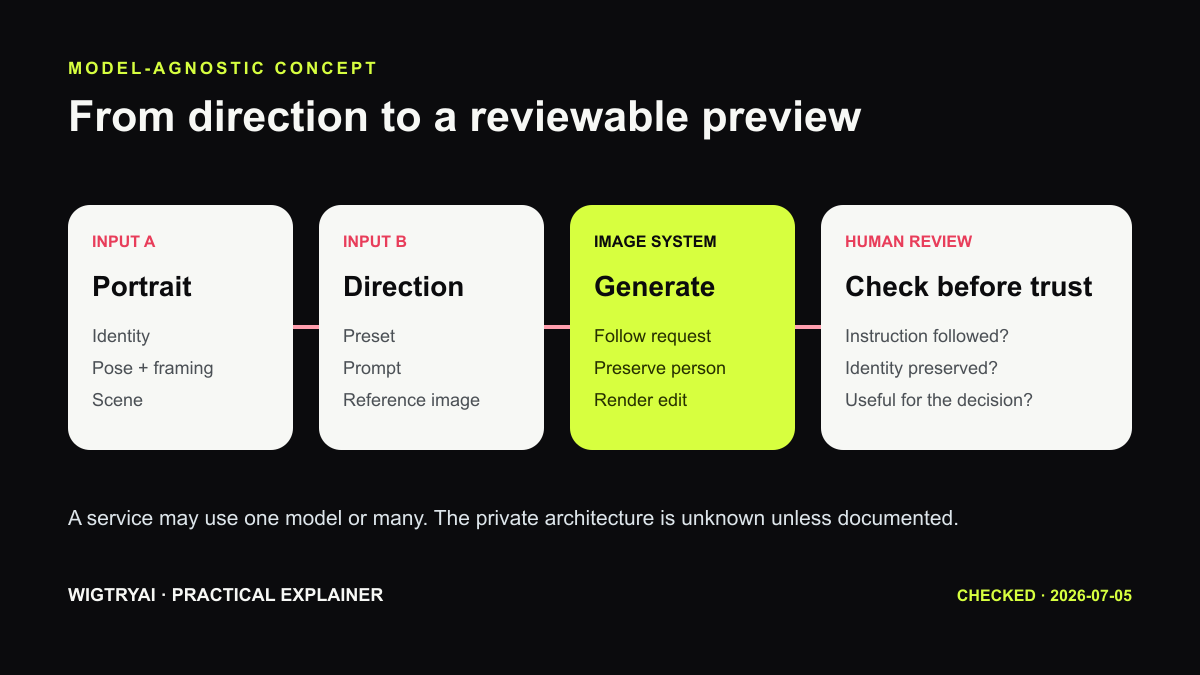 A model-agnostic view of the user-visible workflow. A specific service may combine, reorder, or omit these stages.
Why a Model-Agnostic Explanation Is More Honest
It is tempting to describe every hairstyle app as a neat sequence of face detection, hair segmentation, style transfer, blending, and color correction. Those concepts are useful, but they do not prove that a particular product runs five separate models or uses a named research architecture.
Modern systems may use one multimodal image-editing model, several specialized models, a catalog overlay, a 3D renderer, or a hybrid assembled by an external provider. Unless a vendor publishes technical documentation, its exact internal pipeline is unknown.
What we can explain reliably is the information flow visible to the user.
1. The System Receives a Portrait
The portrait provides identity, pose, expression, skin tone, clothing, framing, and background. A well-designed edit attempts to preserve most of that information while changing the hair region.
Clear inputs help because the system has less ambiguity to resolve. Use:
- a front-facing or gently angled portrait;
- even light without a hard shadow across the face;
- visible eyes, forehead, and face outline;
- enough room around the head for longer styles;
- no heavy beauty filter, hat, or hand covering the hairline.
Pulling hair back can help some tools, but it is not a universal requirement. Follow the instructions of the service you are using.
2. You Provide a Style Direction
Different products accept different kinds of control:
Preset selection
You choose labels such as bob, pixie, body wave, long straight, curly, or braids. Presets are easy to compare because the available choices are constrained.
Text description
You describe a look in words. This offers flexibility, but the same prompt can produce variable interpretations.
Reference image
You provide a second image whose silhouette, texture, color, length, or parting should guide the edit. A reference can communicate details that are difficult to name, but it still does not guarantee an exact copy.
Product selection
A retailer connects the preview to a listing. This may help visualize broad appearance, but it cannot verify the physical product.
3. An Image System Produces an Edit
The generation or editing system combines the portrait with the selected direction. Internally, it may reason about boundaries, depth, occlusion, lighting, and facial structure. The implementation might involve segmentation or landmark information, but those details should be treated as possibilities rather than universal facts.
The practical objective is simpler to state:
Change the hair in the requested direction while keeping the person and scene recognizable.
The system must decide where new hair can appear, what old hair should be replaced, how strands overlap the face or shoulders, and how the new region fits the lighting of the portrait.
4. Preservation Matters as Much as Hair Quality
A result can contain attractive hair and still be a poor try-on if it changes the person. Review:
- eye shape, nose, mouth, jaw, and skin tone;
- age, expression, makeup, and accessories;
- pose, clothing, background, and image crop;
- the requested length, volume, part, texture, and color;
- leftover original hair or unexplained artifacts.
Identity preservation is not guaranteed. Generative image systems can alter areas outside the requested region, especially when the prompt is complex or the source image is ambiguous.
5. The Result Needs Human Review
The final image is not a measurement or professional recommendation. A useful review asks three separate questions:
- Did the edit follow the request? Check silhouette, length, texture, color, and parting.
- Did it preserve the portrait? Check the face and everything that was not meant to change.
- Does it help the decision? Compare it with another meaningfully different option.
If one result fails, generate another rather than rationalizing the artifact. Variability is part of the technology.
How WigTryAI Uses This Pattern
WigTryAI sends the user's portrait, a selected hairstyle reference, and written constraints to an image-editing provider. The instructions ask the system to change the hair while preserving identity, pose, clothing, and background. Provider and model choices can change over time, so we do not describe a fixed proprietary architecture that the product does not own.
The generated image is then saved so it can be shown in recent results and comparison workflows. This storage behavior is why the privacy policy—not an assumption about "processing in memory"—is the source of truth for retention.
Why Results Differ
Input ambiguity
Low light, a cropped head, existing hair over the face, or a busy background gives the system harder decisions.
Control method
A broad preset, a detailed prompt, and a reference image communicate different amounts of information.
Model behavior
Different providers balance instruction following, identity preservation, speed, and creative variation differently.
Randomness
Two generations with identical inputs may not match. Compare several outputs before judging a style direction.
Product constraints
Some tools favor fast previews or a fixed catalog; others favor open-ended generation. Neither approach is automatically better.
A Practical Testing Protocol
- Use one clear portrait for the whole session.
- Change one variable at a time: shape, then texture, then color.
- Save the selected preset, prompt, or reference with the result.
- Check the face before evaluating the hair.
- Compare two to four strong candidates side by side.
- Treat the shortlist as a discussion aid for a stylist or seller.
If the shortlist is for social content, our guide to creating an AI hair transformation video for TikTok explains how to choose a clear reveal, animate only a checked final look, and review the clip for identity drift.
Bottom Line
AI hairstyle try-on is best understood as guided image editing, not a digital mirror of future reality. A portrait and style direction go into an image system; the output must be checked for instruction following, identity preservation, artifacts, and decision value.
That explanation remains accurate even as providers and model architectures change.
Ready to test the workflow on your own photo? Try hairstyles online with WigTryAI—choose a direction or upload a reference image, generate one preview, and compare it before you commit to a cut.
Sources Checked
- OpenAI image generation guide
- Google MediaPipe Face Landmarker overview
- WigTryAI AI Hairstyle Changer
- WigTryAI Privacy Policy
Editorial disclosure: This article describes common concepts and WigTryAI's observable integration pattern. It does not claim access to competitors' private model architecture.