
A new hairstyle can look perfect in a saved photo and completely different once it is cut on your own hair. That is true for almost everyone, but it is especially common with curly and wavy textures.
A shoulder-length cut may spring up several inches after it dries. Soft bangs may turn into a much shorter fringe. Layers that look subtle on someone with loose waves may create a rounder, fuller shape on tighter curls.
That does not mean inspiration photos are useless. They are a great place to start. The key is understanding what they can show you—and what they cannot.
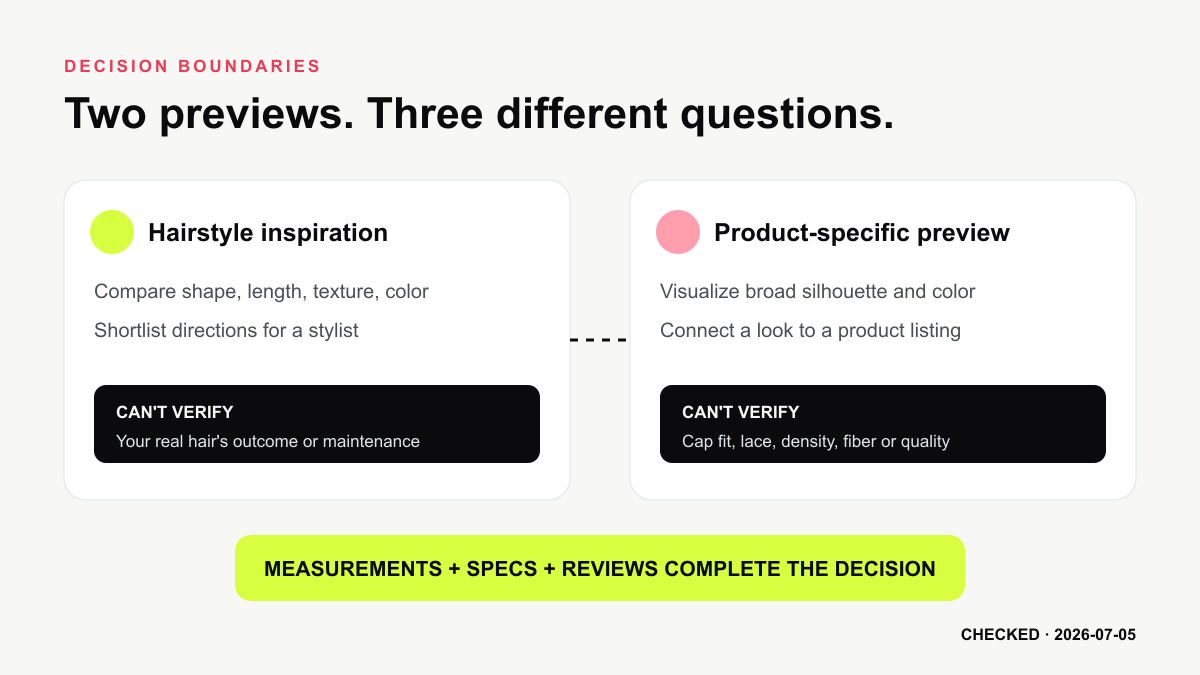
Hairstyle preview tools offer another way to explore a change before sitting in the salon chair. They can help you compare different lengths, shapes, colors, and types of bangs on your own face. They will not tell you exactly how your natural hair will behave, but they may help you narrow down your options and have a more productive conversation with your stylist.
Why Curly and Wavy Hair Can Be Difficult to Visualize
When you look at a hairstyle online, you are not just looking at a haircut. You are also seeing that person’s natural texture, density, styling routine, hair products, lighting, and sometimes extensions or professional finishing.
All of those details affect the final look.
Curl pattern is only one part of the picture. Two people who both have 3A curls, for example, may have very different hair density, strand thickness, shrinkage, and volume. The same layered cut can look light and airy on one person and much fuller on another.
Shrinkage also makes length difficult to judge. Hair that reaches the shoulders when wet may sit closer to the chin once it is dry. The amount of shrinkage can even change from day to day depending on humidity, products, and styling methods.
Face-framing pieces can be unpredictable too. A layer that falls near the cheekbone in a straight-hair reference photo may sit much higher when it curls. Bangs require even more care because a small difference in length can make a major difference once the hair dries.
This is why it is usually more helpful to focus on the overall idea behind a hairstyle rather than trying to copy every detail.
What Hairstyle Preview Tools Actually Show
Most hairstyle preview tools work in a similar way. You upload a clear photo, select a hairstyle or add a reference image, and the tool creates a visual version of you wearing that look.
Some tools are mainly designed for hair color. Others allow you to try different lengths, textures, bangs, layers, or overall shapes.
For example, WigTryAI lets you use your own photo to explore different hairstyle ideas. The result is not a technical prediction of what will happen during a real haircut. It is closer to a visual mockup—something that helps you imagine the general direction.
That distinction matters.
A preview may show that a chin-length bob feels too short for you, or that you like the look of more volume around your cheekbones. It may help you realize that you prefer long face-framing layers over full bangs. Those are useful discoveries, even if the generated curl pattern is not identical to your natural hair.
What a Preview Can Help You Decide
The most useful part of a hairstyle preview is comparison.
Instead of trying one dramatic look and deciding whether you love it, create several versions and compare them side by side.
Short, medium, or long?
Length is one of the easiest things to compare visually. You may not get an exact prediction of where your curls will fall, but you can still see how a shorter or longer silhouette works with your face and shoulders.
When looking at a shorter option, remember to allow for shrinkage. If the preview shows the hair sitting at your chin, your real curls may end up higher depending on your texture and how the cut is shaped.
Where should the volume sit?
Curly hairstyles can create very different shapes even when the length is similar.
One cut may have more width around the cheeks, while another keeps the volume lower near the shoulders. A rounded shape can feel playful and bold. Longer layers may create a more stretched, vertical look.
Neither is better. It comes down to what feels right for your face, personal style, and normal routine.
Bangs or no bangs?
Bangs are one of the biggest visual changes you can make without cutting off a large amount of hair.
A preview can help you compare curly bangs, curtain bangs, a side-swept fringe, or an open forehead. Pay attention to the overall balance rather than the exact curl placement.
If you like the idea of bangs, ask your stylist how much shrinkage to expect and whether they recommend cutting them dry.
Would a different color suit you?
Hair color previews are useful for comparing broad color directions.
You can see whether you prefer a warmer brown, a deeper shade, copper tones, lighter highlights, or a cooler color. The exact shade will depend on your starting color, hair condition, lighting, and the coloring process, but a preview can still help you decide which color family feels most natural.
What the Preview Cannot Tell You
A generated image can look polished, but real hair is rarely that predictable.
Natural curls often vary across the same head. You may have tighter curls near the temples, looser sections at the crown, and areas that are more likely to frizz. A preview may make the texture look more uniform than it really is.
It may also add fullness that your hair does not naturally have—or remove some of the volume that you do have. This can make bangs, layered cuts, and rounded styles look easier to achieve than they would be in everyday life.
The image also cannot tell you how much work a style requires.
A smooth, stretched look may need regular blow-drying or heat styling. Defined curls may require sectioning, diffusing, finger coiling, or a specific product routine. A short curly cut may look simple but need frequent trims to keep its shape.
Most importantly, a preview cannot account for your stylist’s technique, the health of your hair, previous color treatments, or the way your curls respond to a wet or dry cut.
Use the result as a starting point, not a promise.
How to Get More Useful Results
Start with a clear, front-facing photo taken in natural or even lighting. Your full face and hairline should be visible. Avoid heavy filters, strong shadows, hats, and photos where part of your face is covered.
Use the same photo for every hairstyle you compare. If you change the angle, lighting, expression, and hairstyle at the same time, it becomes harder to tell what you actually like.
It also helps to change one thing at a time.
You might begin by comparing three different lengths in a similar color. Then compare bangs with no bangs. After that, try different amounts of volume or a few color variations.
You can preview different hairstyles on your photo and save the versions that feel closest to something you would realistically wear.
As you compare them, ask yourself practical questions:
- Do I like where the hair falls around my face?
- Does the volume feel balanced?
- Would I be comfortable with hair touching my forehead?
- Does this look fit the way I usually dress?
- How much time would I be willing to spend styling it?
- Would I still like the shape on a humid or low-maintenance day?
Those questions are more useful than deciding whether a generated image looks flawless.
A Simple Curly and Wavy Hair Comparison
Suppose you are ready for a change but have not decided how dramatic you want it to be.
Start with one clear photo and create a few realistic options.
The first might be a shoulder-length cut with long layers. This can help you see whether medium-length hair gives you enough movement without feeling too short. Look at where the shortest layers fall and remember that your natural curls may sit higher.
Next, try a rounded curly bob. Compare a chin-length version with one that falls a little lower. Notice whether you like the extra width around the cheeks and whether the style feels like something you would maintain with regular trims.
Then try curly bangs with face-framing layers. The goal is not to predict the exact shape of every curl. It is simply to see how you feel with more hair around your forehead and eyes.
Finally, try a longer style with a warmer color or soft highlights. You may discover that you do not actually want a major haircut—a color change or different styling approach may be enough.
The most useful comparison keeps the same person, lighting, and camera angle in every version. That lets you judge the change in silhouette, volume, length, and color without confusing it with a different photo.
Once you have a few favorites, save them and bring them to your salon appointment.
What to Discuss With Your Stylist
Your stylist will be able to tell you which parts of a preview are realistic for your hair and which parts may need to be adjusted.
Ask how much shrinkage you should expect and whether the cut should be done wet, dry, or with a combination of both. Talk about how the shape will grow out and how often it will need to be trimmed.
You should also be honest about your normal routine.
If you usually air-dry your hair and spend five minutes styling it, a look that requires a weekly blowout or detailed curl-by-curl styling may not be a good match. If you live in a humid climate, ask how the cut will look when your hair has more volume or frizz.
When showing your preview, explain what you like about it instead of asking for an exact copy.
You might say, “I like the shoulder length and the fuller shape, but I want to keep my natural curl pattern,” or, “I like the face-framing pieces, but I do not want full bangs.”
That gives your stylist room to create a version that works with your actual hair.
The Bottom Line
Hairstyle previews can be helpful when you are choosing between different lengths, shapes, colors, or types of bangs. They give you a chance to experiment without making an immediate change.
For curly and wavy hair, the results are best used for inspiration and comparison. They cannot accurately predict shrinkage, curl definition, density, maintenance, or the exact outcome of a salon appointment.
Use them to figure out what you are drawn to, save a few realistic options, and bring those ideas to a stylist who understands textured hair.
You may not be able to see the exact final result in advance, but you can walk into the appointment with a clearer idea of what you want—and what questions to ask.