
Is Your Virtual Hairstyle App Safe? A Practical Privacy Checklist
Hairstyle apps are generally safe — check five things first: purpose, storage, model training, sharing, and deletion. Ask before you upload a selfie.
Last updated: July 2026 · 8 min read
Written by the WigTryAI team. WigTryAI is our product, and its current retention behavior is disclosed below. Information checked: July 5, 2026. Product features and policies can change; read the policy shown by the exact service you use.
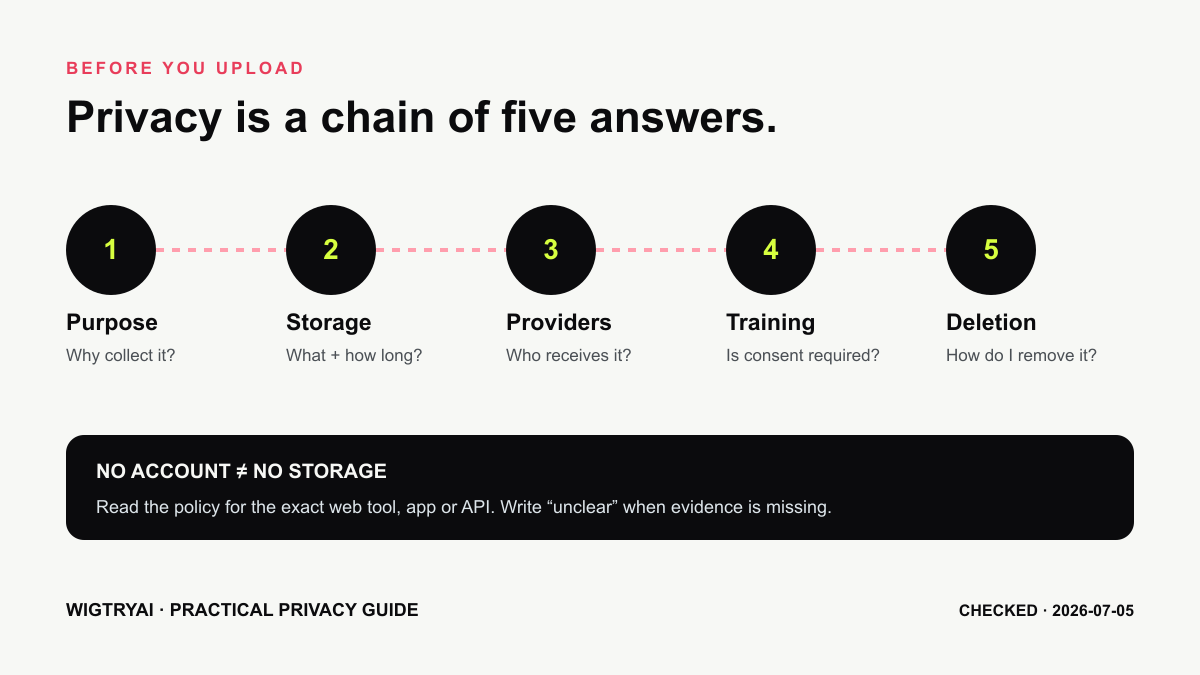 Privacy review is a sequence of concrete questions, not a single tier or trust badge.
Begin With Precise Language
A selfie is generally personal data when it relates to an identifiable person. It is not automatically special-category biometric data under every law simply because a face appears in it.
Under GDPR and UK GDPR definitions, biometric data involves specific technical processing of physical, physiological, or behavioral characteristics that allows or confirms unique identification. Processing a portrait to change a hairstyle is not necessarily the same purpose as face recognition or identity authentication.
That distinction does not make a selfie low-risk. A clear portrait can still be sensitive, linkable to you, copied, retained, or exposed. The practical response is to ask what the service does with the image.
The Five Questions to Ask
1. Why is the image collected?
Look for a narrow purpose such as generating the requested preview. Then check whether the terms also permit advertising, analytics, product improvement, model training, identity verification, or unrelated research.
Avoid assuming that a short landing-page promise replaces the privacy policy.
2. Where and how long is it stored?
Some services need temporary server storage to process a request. Others keep uploads and results for history, sharing, or account features. "Temporary," "as necessary," and "while your account is active" describe very different periods.
Look for separate answers about:
- the original upload;
- the generated result;
- logs, backups, and caches;
- public or shareable links;
- retention after account or result deletion.
3. Who receives it?
An app may use cloud hosting, image-generation providers, analytics services, payment processors, customer-support tools, and other service providers. "We do not sell images" is useful, but it is not the same as "no other company processes the image."
Read the sections about service providers, affiliates, legal requests, international transfers, and business transactions.
4. Is it used for model training?
Search the policy and terms for "train," "improve," "research," "develop," "user content," and "machine learning." The strongest answer is explicit and specific about whether opt-in consent is required.
If the wording is broad or unclear, do not infer a privacy guarantee from silence.
5. How can you delete it?
Check whether you can remove an individual result, delete an account, revoke a share link, or contact support. A good deletion explanation says what is removed and whether backup retention or legal exceptions remain.
Account-Free Does Not Mean Storage-Free
Using a tool without an account can reduce the profile data attached to a session. It does not prove that the uploaded photo, IP address, cookie identifiers, or generated result is never stored.
Conversely, an account can provide useful controls such as history management and deletion. Judge the documented data flow, not the presence of a login screen alone.
What WigTryAI Currently Says
WigTryAI's public privacy policy states that:
- customer selfies are used to generate try-on previews;
- customer images are not sold;
- images are not used for identity verification;
- images are not used to train AI models unless explicit permission is requested first;
- the original selfie is deleted from WigTryAI storage within 24 hours;
- generated previews may remain available so customers and sellers can view recent results;
- deletion requests can be sent to
support@wigtryai.com.
The product also uses external infrastructure and image-generation providers to deliver the service. Therefore, "processed only in memory" and "no third-party processing" would not be accurate descriptions.
The compact consumer flow can remove a generated look from visible history. Users should contact support for broader privacy, generated-preview deletion, or share-removal requests.
How to Read Competitor Claims
Do not reduce a product to a single privacy grade without documenting the policy text and the exact service covered.
For example, Perfect Corp publishes separate consumer and app policies, and its retention language varies by feature. Fotor, LightX, HairstyleAI.ai, and other tools make privacy statements on product pages or policies that can change independently of feature copy. A vendor may also operate different mobile, web, and API services.
When comparing tools, record:
| Item | What to capture |
|---|---|
| Service | Exact web tool, mobile app, or API used |
| Policy | Direct URL and effective date |
| Account | Required, optional, or only required after free use |
| Upload retention | Quoted or accurately paraphrased period |
| Result retention | History, sharing, and deletion behavior |
| Training | Opt-in, opt-out, permitted, prohibited, or unclear |
| Providers | Hosting and subprocessors described by the service |
If a field is unclear, write unclear. Do not replace missing evidence with "standard retention" or a guess about server location.
Practical Steps Before Uploading
The same checklist applies whether you open an app or a browser-based virtual hairstyle try-on — the image leaves your device either way, so the questions are the same.
- Use a purpose-made photo. Avoid IDs, children, other people, workplace badges, home addresses, and sensitive background details.
- Check the crop. Remove unnecessary surroundings before upload.
- Review metadata. Many services re-encode images, but do not assume every tool strips EXIF or location data.
- Read the current policy. Save the URL and effective date if the image is sensitive.
- Check sharing defaults. Confirm whether results are private, unlisted, or public.
- Use the minimum account data required. Do not provide extra profile information without a reason.
Practical Steps After Use
- Delete unwanted results using the product controls.
- Revoke public or shared links you no longer need.
- Delete the account if you do not plan to return.
- Contact support when the interface does not cover the deletion you need.
- Keep the confirmation for a sensitive request.
- Revoke camera permission if you granted persistent browser or app access.
Clearing browser cookies may reduce local tracking state, but it does not delete files already stored by the service.
A Compact Privacy Checklist
- I know which company and exact service receives the photo.
- I know why the original and result are processed.
- I found the retention language for uploads and generated images.
- I checked model-training and product-improvement terms.
- I checked service-provider and sharing language.
- I know whether a result link is private, unlisted, or public.
- I know how to delete a result, account, and share link.
- I am comfortable with the unanswered questions.
Do not convert this checklist into a numerical "privacy score." One missing fact—such as indefinite retention or training rights—can matter more than several minor positives.
Bottom Line
The safest tool is not automatically the smallest company, the service with no login, or the app hosted in a particular country. It is the service whose documented behavior matches your risk tolerance and whose controls let you act on that choice.
Use a low-sensitivity portrait, read current terms, minimize what you provide, and delete what you no longer need. For legal, medical, employment, or other high-stakes situations, obtain professional privacy advice.
Sources Checked
- WigTryAI Privacy Policy
- ICO: What is special category data?
- GDPR Article 4 definitions
- FTC policy statement on biometric information
- YouCam B2C Privacy Policy
Editorial disclosure: This guide is informational and is not legal advice. WigTryAI is our product, and we have used its published policy rather than assigning it a favorable privacy rank.